Writing effective prompts is one of the most important skills for using ChatGPT successfully. While understanding prompt engineering helps users communicate effectively with AI, having a well-organized Prompt Library makes the process faster, more consistent, and more productive.
A Prompt Library is a collection of carefully designed prompts organized by subject, profession, or purpose. Instead of creating new prompts from scratch each time, users can select an existing prompt, customize it, and quickly generate high-quality results.
Whether you are a student preparing for an examination, a teacher designing classroom activities, a professional writing reports, a business owner creating marketing content, or a content creator developing social media posts, a Prompt Library provides reusable templates that save time and improve productivity.
This module introduces a comprehensive collection of prompt libraries for education, teaching, studying, professional work, business, and creative content creation. It also teaches learners how to build and maintain their own personalized Prompt Library for lifelong use.
Learning Objectives
After completing this module, learners will be able to:
Understand the purpose and value of a Prompt Library.
Use ready-made prompts efficiently.
Customize prompts for different tasks.
Organize prompts into categories.
Build a personal Prompt Library.
Improve productivity using reusable prompts.
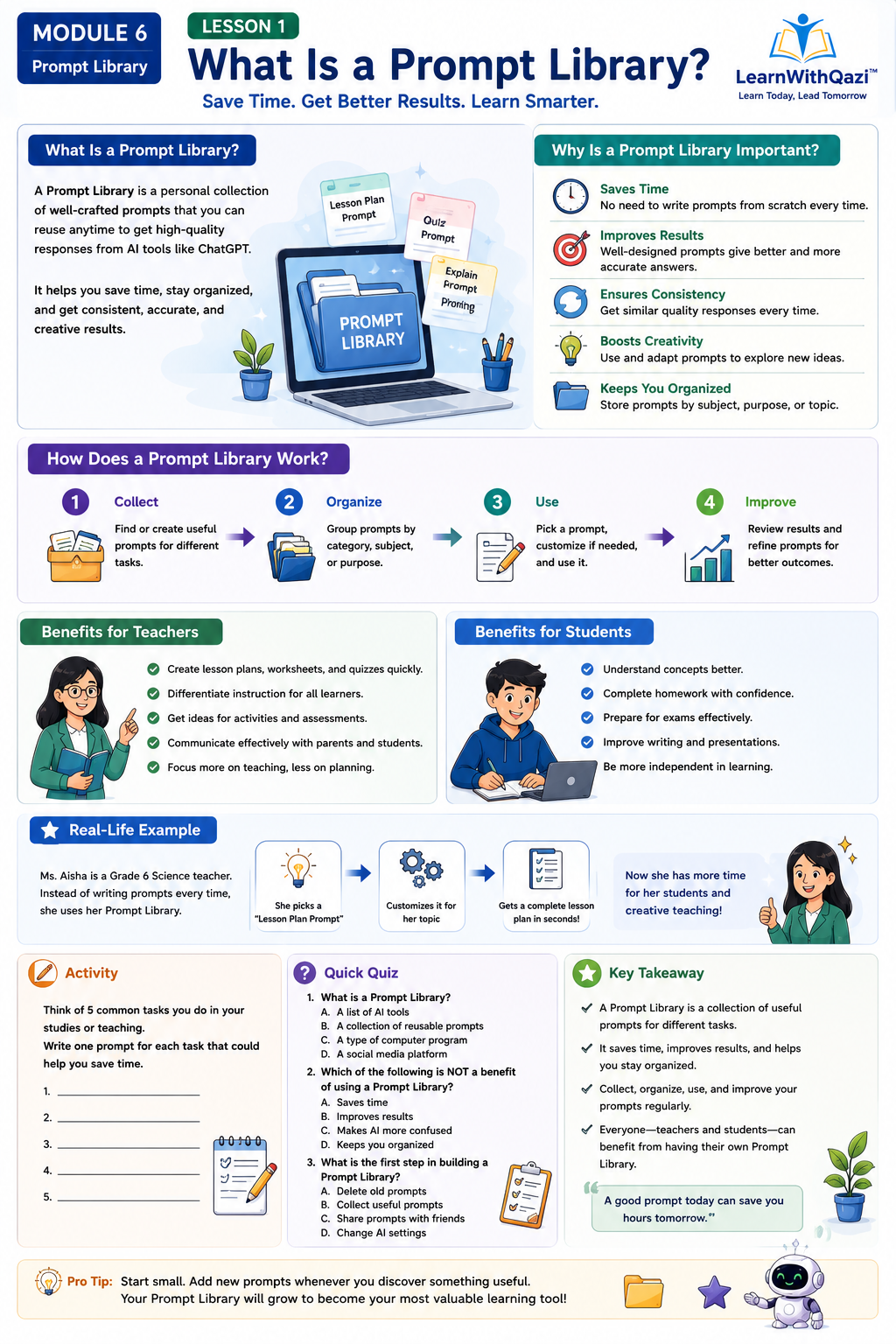
Lesson 1: What Is a Prompt Library?
Introduction
Many ChatGPT users know what they want to accomplish but are unsure how to ask the AI effectively. As a result, they often spend unnecessary time rewriting prompts or receive responses that do not fully meet their expectations.
A Prompt Library solves this problem by providing a structured collection of reusable prompts that have already been tested and refined. Instead of creating new prompts repeatedly, users can select an existing prompt, customize it, and receive consistent, high-quality results.
Think of a Prompt Library as a digital toolbox. Just as a carpenter chooses the right tool for a specific job, ChatGPT users select the right prompt for each task. Over time, building a personal Prompt Library becomes an invaluable resource for learning, teaching, working, and creating content.
Explanation
What is a Prompt Library?
Why Prompt Libraries are useful
Personal vs. professional prompt libraries
Organizing prompts into categories
Reusing and improving prompts
Why It Matters
Saves time
Improves AI responses
Reduces repetitive typing
Builds consistency
Increases productivity
Helps beginners get started quickly
Real-Life Example
A teacher preparing weekly lesson plans saves a master lesson-planning prompt. Every week, the teacher simply changes the topic instead of writing a new prompt from scratch.
Example Prompt
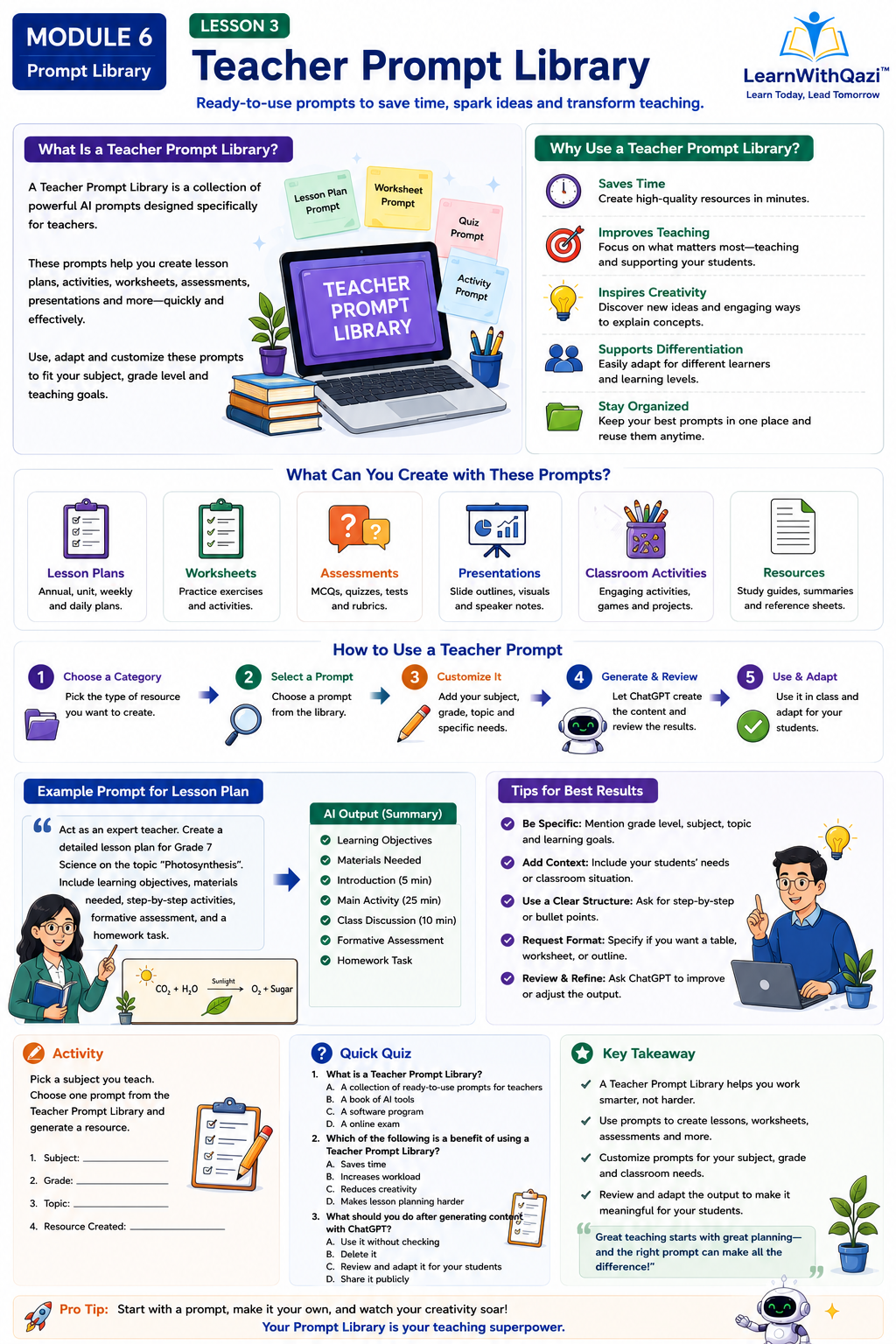
Act as an experienced Grade 5 teacher. Create a complete lesson plan on fractions, including learning objectives, classroom activities, worksheets, homework, assessment, and an exit ticket.
Best Practices
Organize prompts into folders.
Give prompts descriptive titles.
Test and refine prompts regularly.
Save prompts that consistently produce excellent results.
Hands-on Activity
Create folders titled:
Education
Teaching
Students
Business
Creativity
Save five prompts in each folder.
Quick Quiz
What is a Prompt Library?
Why should prompts be organized?
How does a Prompt Library save time?
Why should prompts be updated?
Key Takeaway
A Prompt Library helps users work smarter by providing organized, reusable prompts that improve productivity and AI interactions.
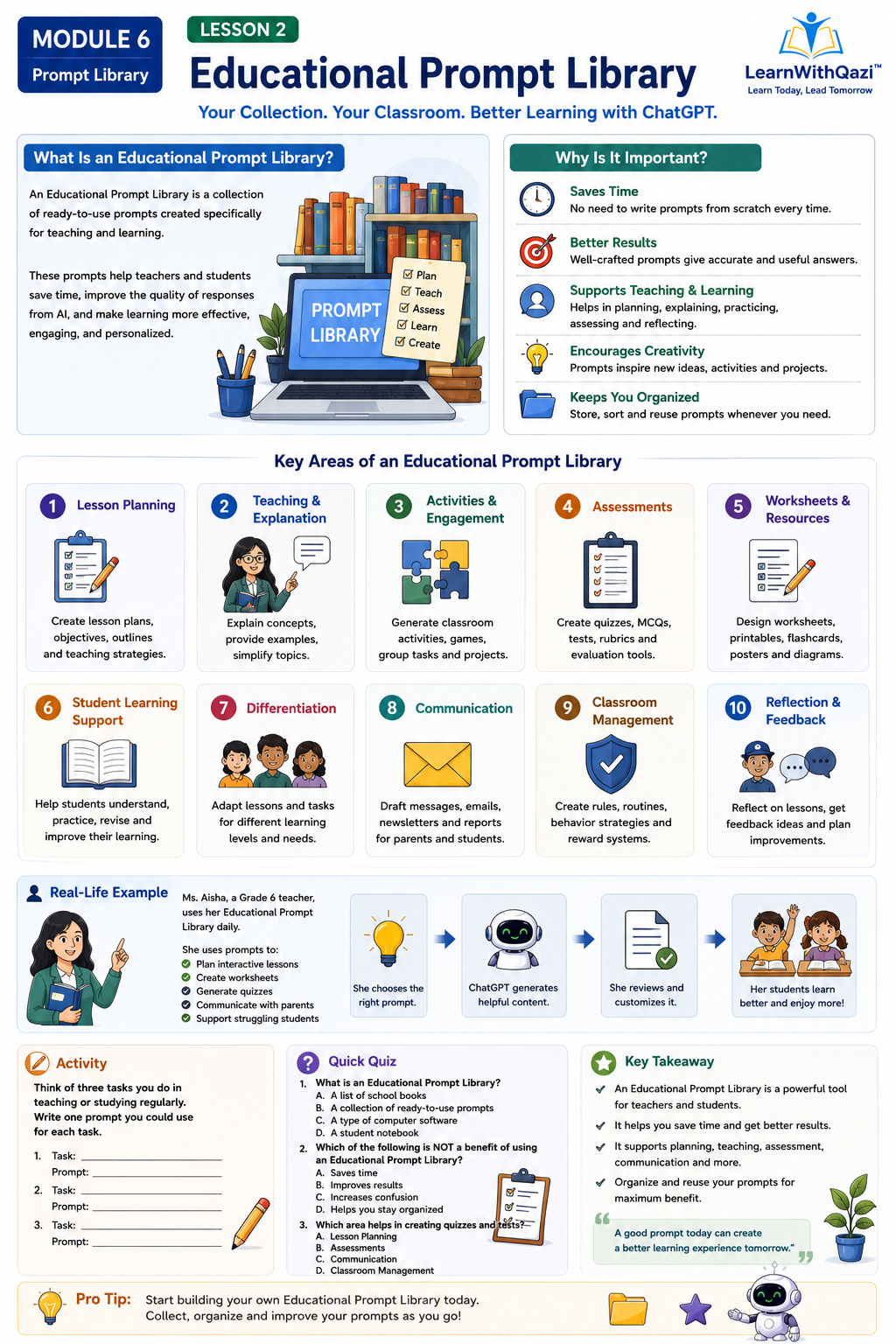
Lesson 2: Educational Prompt Library
Introduction
Education is one of the most powerful applications of ChatGPT. Students, teachers, parents, and lifelong learners can all benefit from a collection of educational prompts that simplify learning and teaching.
Explanation
This library includes prompts for:
Learning new concepts
Homework assistance
Lesson summaries
Flashcards
Revision notes
Mind maps
Vocabulary building
Mathematics
Science
Languages
Programming
Exam preparation
Study schedules
Ready-to-Use Prompt Collection
Real-Life Example
A Grade 8 student preparing for a science examination uses ChatGPT to generate revision notes, flashcards, and practice quizzes.
Best Practices
Include grade level.
Specify subject.
Ask for examples.
Request quizzes and answer keys.
Activity
Create prompts for Mathematics, Science, English, and Social Studies.
Quiz
Key Takeaway
Educational prompts help learners study more effectively and efficiently.
Lesson 3: Teacher Prompt Library
Introduction
Teachers perform many responsibilities beyond classroom instruction, including lesson planning, assessment, classroom management, communication, and professional development. A Teacher Prompt Library simplifies these tasks by providing reusable prompts.
Explanation
Categories include:
Lesson plans
Classroom activities
Interactive learning
Worksheets
Quizzes
MCQs
Rubrics
Homework
Exit tickets
Parent communication
Report comments
Classroom management
Presentations
Educational games
Project-based learning
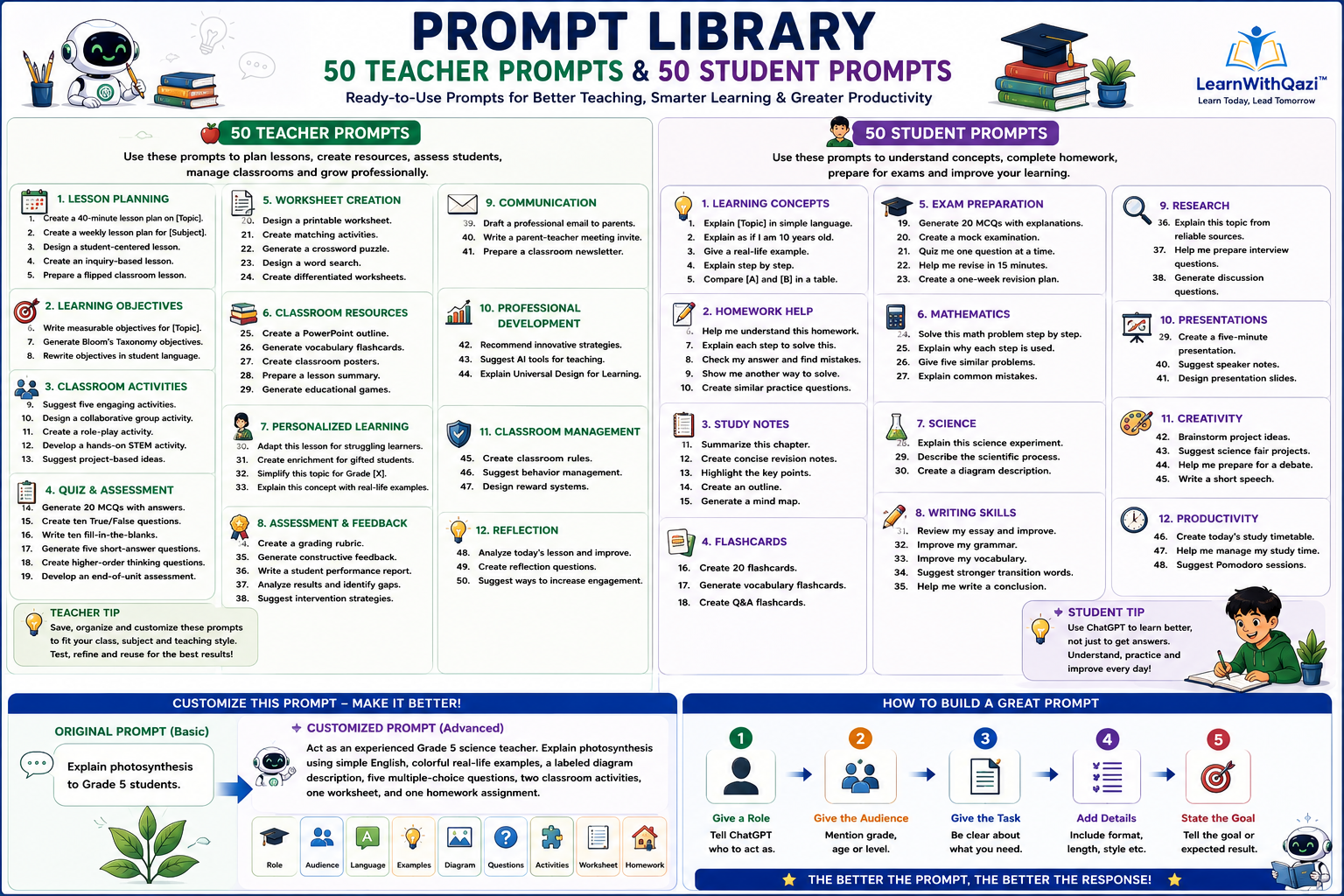
Ready-to-Use Prompt Collection
No.
Category
Purpose
Prompt
1
Lesson Planning
Complete Lesson Plan
Act as an experienced Grade [X] teacher. Create a detailed 40-minute lesson plan on [Topic] including learning objectives, introduction, activities, assessment, homework, and an exit ticket.
2
Lesson Planning
Weekly Planning
Prepare a one-week lesson plan for [Subject] aligned with curriculum standards and learning outcomes.
3
Lesson Planning
Student-Centered Learning
Design a student-centered lesson that encourages collaboration and critical thinking.
4
Lesson Planning
Inquiry Learning
Create an inquiry-based lesson plan that encourages students to investigate and discover concepts independently.
5
Lesson Planning
Flipped Classroom
Develop a flipped classroom lesson where students learn basic concepts at home and complete activities in class.
6
Learning Objectives
Bloom’s Taxonomy
Write measurable learning objectives using Bloom’s Taxonomy for [Topic].
Rewrite these learning objectives in language that students can easily understand.
9
Classroom Activities
Icebreaker
Suggest five engaging warm-up activities for today’s lesson.
10
Classroom Activities
Group Work
Design a collaborative classroom activity for [Topic].
11
Classroom Activities
Role Play
Create a role-play activity that helps students understand [Concept].
12
Classroom Activities
STEM Activity
Develop a hands-on STEM activity using simple classroom materials.
13
Classroom Activities
Project-Based Learning
Suggest a project-based learning activity related to [Topic].
14
Assessment
Multiple Choice
Generate 20 curriculum-based MCQs with answer keys and explanations.
15
Assessment
True/False
Create ten True/False questions with explanations.
16
Assessment
Fill in the Blanks
Write ten fill-in-the-blank questions for revision.
17
Assessment
Short Questions
Generate five short-answer questions with marking criteria.
18
Assessment
Higher-Order Thinking
Create higher-order thinking questions based on Bloom’s Taxonomy.
19
Assessment
Unit Test
Develop a complete end-of-unit assessment with an answer key.
20
Worksheets
Practice Worksheet
Design a printable worksheet on [Topic].
21
Worksheets
Matching Exercise
Create a matching exercise using lesson vocabulary.
22
Worksheets
Crossword
Generate an educational crossword puzzle using today’s lesson keywords.
23
Worksheets
Word Search
Design a word-search puzzle for [Topic].
24
Worksheets
Differentiated Learning
Create beginner, intermediate, and advanced worksheets for the same topic.
25
Classroom Resources
Presentation
Prepare a PowerPoint presentation outline with speaker notes.
26
Classroom Resources
Flashcards
Generate printable vocabulary flashcards with pictures and definitions.
27
Classroom Resources
Poster
Design a colorful educational classroom poster.
28
Classroom Resources
Lesson Summary
Create a one-page lesson summary for students.
29
Classroom Resources
Educational Games
Suggest five classroom games related to [Topic].
30
Personalized Learning
Struggling Learners
Adapt this lesson for students who need additional support.
31
Personalized Learning
Gifted Students
Create enrichment activities for advanced learners.
32
Personalized Learning
Simplification
Explain this lesson using simple language suitable for Grade [X].
33
Personalized Learning
Real-Life Learning
Connect this lesson to real-life situations students experience every day.
34
Feedback
Rubric
Create a grading rubric for this assignment.
35
Feedback
Student Feedback
Generate constructive feedback comments for student work.
36
Feedback
Progress Report
Write a detailed student progress report.
37
Feedback
Learning Gaps
Analyze assessment results and identify learning gaps.
38
Feedback
Intervention
Recommend intervention strategies for struggling learners.
39
Communication
Parent Email
Draft a professional email to parents about student progress.
40
Communication
Meeting Invitation
Write a parent-teacher meeting invitation.
41
Communication
Newsletter
Prepare a monthly classroom newsletter.
42
Professional Development
Teaching Strategies
Recommend innovative teaching strategies for [Topic].
43
Professional Development
AI Tools
Suggest AI tools that enhance classroom teaching.
44
Professional Development
Inclusive Education
Explain how to apply Universal Design for Learning (UDL) in this lesson.
45
Classroom Management
Classroom Rules
Create positive classroom rules for Grade [X].
46
Classroom Management
Behavior Management
Suggest positive behavior management techniques.
47
Classroom Management
Reward System
Design a classroom reward system that motivates learners.
48
Reflection
Lesson Reflection
Analyze today’s lesson and recommend improvements.
49
Reflection
Teacher Reflection
Create self-reflection questions for teachers after the lesson.
50
Reflection
Student Engagement
Suggest practical ways to increase student engagement in future lessons.
Real-Life Example
A science teacher prepares an entire week’s lessons in less than one hour using saved prompts.
Best Practices
Align prompts with curriculum standards.
Specify grade level.
Include learning objectives.
Review AI-generated content.
Activity
Build a Teacher Prompt Library with at least 25 prompts.
Quiz
Key Takeaway
Teacher prompts save preparation time while improving classroom quality.
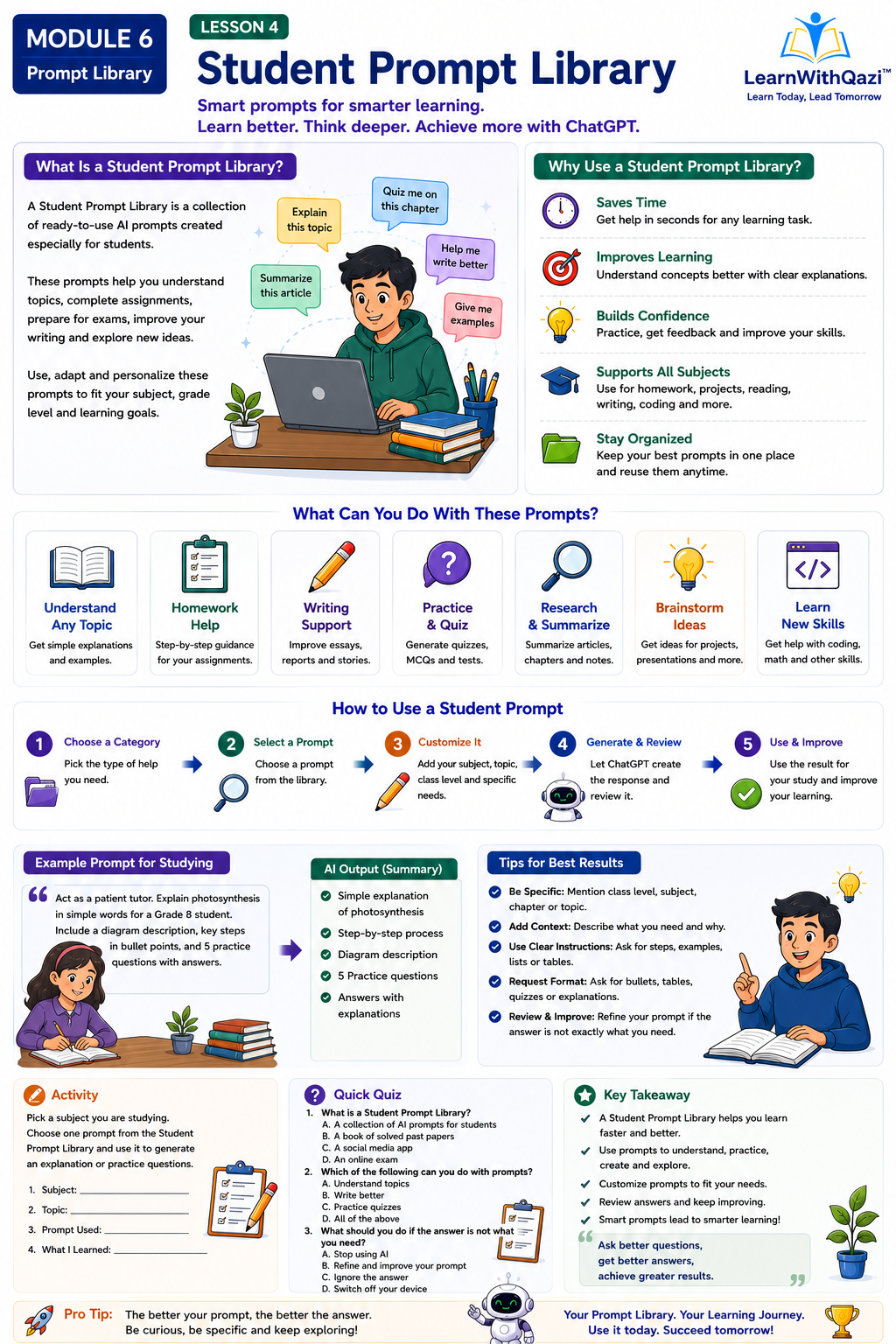
Lesson 4: Student Prompt Library
Introduction
Students can use ChatGPT to improve understanding, complete homework, prepare for examinations, and strengthen writing and critical thinking skills.
Explanation
Prompt categories include:
Homework help
Study notes
Flashcards
Summaries
Essay writing
Practice tests
Research
Time management
Presentations
Oral practice
Difficult concepts
Revision plans
Ready-to-Use Prompt Collection
No.
Category
Purpose
Prompt
1
Learning Concepts
Simple Explanation
Explain [Topic] using simple language suitable for Grade [X] students.
2
Learning Concepts
Child-Friendly Explanation
Explain this concept as if I am 10 years old.
3
Learning Concepts
Real-Life Example
Give me three real-life examples of [Concept].
4
Learning Concepts
Step-by-Step Learning
Explain this topic step by step with examples.
5
Learning Concepts
Compare Concepts
Compare [Concept A] and [Concept B] in a table.
6
Homework
Homework Support
Help me understand this homework without giving me the final answer immediately.
7
Homework
Guided Solution
Explain each step used to solve this problem.
8
Homework
Answer Checking
Check my answer and explain any mistakes.
9
Homework
Alternative Method
Show me another method to solve this question.
10
Homework
Extra Practice
Create five similar practice questions.
11
Study Notes
Chapter Summary
Summarize this chapter into one page.
12
Study Notes
Revision Notes
Create concise revision notes.
13
Study Notes
Key Points
Highlight the most important points I should remember.
14
Study Notes
Outline
Organize this lesson into an easy-to-read outline.
15
Study Notes
Mind Map
Generate a mind map for this chapter.
16
Flashcards
Revision Cards
Create 20 revision flashcards.
17
Flashcards
Vocabulary
Generate vocabulary flashcards with meanings and examples.
18
Flashcards
Question Cards
Create question-and-answer flashcards for revision.
19
Exam Preparation
Practice MCQs
Generate 20 multiple-choice questions with explanations.
20
Exam Preparation
Mock Test
Create a complete mock examination with answer keys.
21
Exam Preparation
Oral Practice
Ask me one question at a time and evaluate my answers.
22
Exam Preparation
Quick Revision
Help me revise this chapter in 15 minutes.
23
Exam Preparation
Study Plan
Prepare a one-week revision timetable.
24
Mathematics
Step-by-Step Solution
Solve this mathematics problem step by step.
25
Mathematics
Reasoning
Explain why each step is necessary.
26
Mathematics
Practice
Generate five similar mathematics questions.
27
Mathematics
Common Mistakes
Explain common mistakes students make in this topic.
28
Science
Experiment
Explain this science experiment step by step.
29
Science
Scientific Process
Describe the scientific process using simple language.
30
Science
Diagram
Describe a labeled scientific diagram for this topic.
31
Writing
Essay Review
Review my essay and suggest improvements without rewriting it completely.
32
Writing
Grammar
Correct my grammar while preserving my original writing style.
33
Writing
Vocabulary
Suggest stronger vocabulary for my writing.
34
Writing
Transitions
Recommend better transition words between paragraphs.
35
Writing
Conclusion
Help me write a strong conclusion for my essay.
36
Research
Topic Research
Explain this topic from reliable perspectives and suggest areas for further reading.
37
Research
Interview Questions
Help me prepare interview questions for my project.
38
Research
Discussion Questions
Generate discussion questions for classroom debate.
39
Presentations
Slide Deck
Create a five-minute presentation with slide titles.
40
Presentations
Speaker Notes
Write speaker notes for each presentation slide.
41
Presentations
Presentation Outline
Design a presentation outline with an introduction, body, and conclusion.
42
Creativity
Brainstorming
Brainstorm creative project ideas on [Topic].
43
Creativity
Science Fair
Suggest innovative science fair projects.
44
Creativity
Debate
Help me prepare arguments for a classroom debate.
45
Creativity
Speech
Write a short speech on [Topic].
46
Productivity
Daily Schedule
Create today’s study timetable.
47
Productivity
Time Management
Help me manage my study time effectively.
48
Productivity
Pomodoro
Suggest a Pomodoro study schedule for this subject.
49
Self-Assessment
Quiz Me
Quiz me on this chapter and explain my mistakes after each answer.
50
Self-Assessment
Personalized Revision
Based on my quiz performance, recommend what I should study next.
Real-Life Example
A student preparing for board examinations creates summaries, quizzes, and revision schedules using saved prompts.
Best Practices
Learn concepts instead of copying answers.
Verify AI responses.
Practice independently.
Activity
Build a Student Prompt Library.
Quiz
Key Takeaway
Students learn more effectively by using AI as a learning assistant rather than a shortcut.
Lesson 5: Build Your Own Prompt Library
Introduction
The most valuable Prompt Library is the one you create yourself. As you continue using ChatGPT, you will discover prompts that consistently produce excellent results. Saving, organizing, and improving these prompts creates a personalized resource that grows over time.
Explanation
Learn how to:
Name prompts clearly.
Organize prompts into folders.
Categorize by purpose.
Save favorite prompts.
Refine prompts after testing.
Create reusable templates.
Share prompt collections.
Back up your library.
Suggested Folder Structure
Education
Teachers
Students
Professional Work
Business
Marketing
Writing
Creativity
Research
Personal Productivity
Real-Life Example
A teacher and business owner maintains separate prompt libraries for lesson planning, financial reports, social media content, and educational resources, enabling faster and more consistent work.
Best Practices
Review prompts regularly.
Remove outdated prompts.
Keep prompts organized.
Continuously improve wording based on results.
Final Practical Activity
Build a personal Prompt Library containing at least 25 high-quality prompts organized into categories that match your own learning, teaching, or professional needs.
Final Module Quiz
20 Multiple-Choice Questions
5 Short-Answer Questions
2 Scenario-Based Questions
1 Prompt Improvement Exercise
1 Prompt Organization Activity
Final Key Takeaway
A Prompt Library is more than a collection of prompts—it is a personal knowledge system that helps users interact with ChatGPT more effectively. By organizing, testing, and continuously refining prompts, learners can save time, improve the quality of AI-generated responses, and become more confident and productive in education, professional work, business, and creative projects. This library grows alongside your experience, becoming one of your most valuable digital learning resources.
AI-generated content is any text, image, code, summary, or other material created by Artificial Intelligence.
Example
ChatGPT writes:
An essay
A poem
Computer code
A lesson plan
These are examples of AI-generated content.
Why is it important?
AI-generated content can save time, but it should always be reviewed for accuracy.
What is a Large Language Model (LLM)?
A Large Language Model (LLM) is a type of Artificial Intelligence that is trained on a massive amount of text. It learns how people use language so it can understand questions and generate meaningful responses.
Example
When you ask:
“Write a short story about space.”
The LLM understands the request and creates a new story instead of copying one from a book.
Why is it important?
The LLM is the “brain” behind ChatGPT. It enables ChatGPT to understand language, answer questions, and generate text.
What does Multimodal mean?
Multimodal AI can understand and work with different types of information, such as text, images, and sometimes audio.
Example
A student uploads a picture of a mathematics problem and asks:
Explain how to solve this.
The AI can examine the image and provide a step-by-step explanation.
Why is it important?
Multimodal AI makes learning more interactive because students can ask questions using text, pictures, or other supported formats.
What is an AI Assistant?
An AI assistant is software that helps users perform tasks by answering questions, generating content, solving problems, and providing suggestions.
Example
ChatGPT can:
Answer questions
Write emails
Solve math problems
Explain difficult topics
Why is it important?
AI assistants improve productivity and support learning, but they do not replace human judgment.
What is Human Intelligence?
Human intelligence is the natural ability of people to think, learn, reason, understand, remember, and make decisions.
Example
A teacher explains a difficult lesson by changing the explanation until students understand.
Why is it important?
AI can imitate some human abilities, but it cannot replace human creativity, emotions, or personal experiences.
What is Computer Science?
Computer Science is the study of computers, software, algorithms, and how technology can solve real-world problems.
Example
Computer scientists create applications like ChatGPT, Google Maps, and mobile apps.
Why is it important?
AI is one of the major fields within computer science.
What is Artificial Intelligence?
Artificial Intelligence (AI) is a branch of computer science that enables machines to perform tasks that usually require human intelligence, such as learning, reasoning, solving problems, and understanding language.
Example
When you ask ChatGPT,
“Explain the solar system to a Grade 5 student.”
AI understands your request and provides an easy-to-read explanation.
Why is it important?
AI helps people work faster, learn better, and solve problems more efficiently.
What is Natural Language?
Natural language is the language people use in everyday conversation, such as English, Urdu, Arabic, or Spanish.
Unlike computers, you don’t need special commands or programming language to communicate with ChatGPT.
Example
Instead of writing a computer command:
search(weather_today)
You simply ask:
What will the weather be like tomorrow?
ChatGPT understands the question because it is written in natural language.
Why is it important?
It allows anyone to communicate with AI naturally, without learning programming.
What is a Language Model?
A language model is an AI system trained on large amounts of text. It learns patterns in language so it can understand questions and generate meaningful responses.
Example
You ask:
Write a poem about spring.
The language model understands:
Topic: Spring
Task: Write a poem
Language: English
It then creates a new poem based on what it has learned.
Why is it important?
The language model is the “brain” that allows ChatGPT to read, understand, and generate text.
What is OpenAI?
OpenAI is the company that developed ChatGPT. Its goal is to create AI that is useful, safe, and beneficial for people around the world.
Example
Just as Microsoft created Microsoft Word and Google created Google Search, OpenAI created ChatGPT.
Why is it important?
Knowing the creator helps you understand where ChatGPT comes from and who develops its new features
What does AI-powered mean?
AI-powered means that a system uses Artificial Intelligence (AI) to perform tasks that normally require human thinking, such as understanding language, solving problems, and making decisions.
Example
Instead of typing:
Search for “photosynthesis”
you can ask:
Explain photosynthesis to a Grade 5 student.
The AI understands your request and gives a personalized explanation.
Why is it important?
AI can learn patterns, understand questions, and generate useful responses instead of simply displaying information.
What is ChatGPT?
ChatGPT is an AI-powered chatbot developed by OpenAI. It understands questions written in everyday language and provides helpful, human-like responses.
Example
Student: What causes rain?
ChatGPT: Rain forms when water vapor in the atmosphere cools, condenses into tiny droplets, and falls to the ground.
Why is it useful?
Answers questions
Explains difficult topics
Helps with homework
Assists with writing and learning
A prompt is an instruction you give to AI.
Example:
Write a 200-word story about a magical forest suitable for Grade 5 students.