

Module Overview
Teaching in today’s classrooms requires educators to create engaging lessons, meaningful assessments, and learning experiences that meet the needs of diverse students. Preparing these resources manually can take many hours every week. ChatGPT can serve as an AI teaching assistant by helping teachers plan lessons, generate classroom materials, design assessments, and personalize learning activities.
It is important to remember that ChatGPT does not replace teachers. Instead, it supports teachers by reducing routine work, allowing more time for meaningful instruction, creativity, and student interaction.
Throughout this module, you will explore practical ways to use ChatGPT responsibly in lesson planning, assessment, classroom management, and instructional design.
Learning Objectives
After completing this module, learners will be able to:
- Understand how ChatGPT supports classroom teaching.
- Create complete lesson plans using AI.
- Generate quizzes and classroom assessments.
- Design engaging worksheets.
- Create classroom resources quickly.
- Personalize learning for different ability levels.
- Generate constructive feedback for students.
- Use ChatGPT ethically and responsibly in education.
1- AI Lesson Planning
Introduction
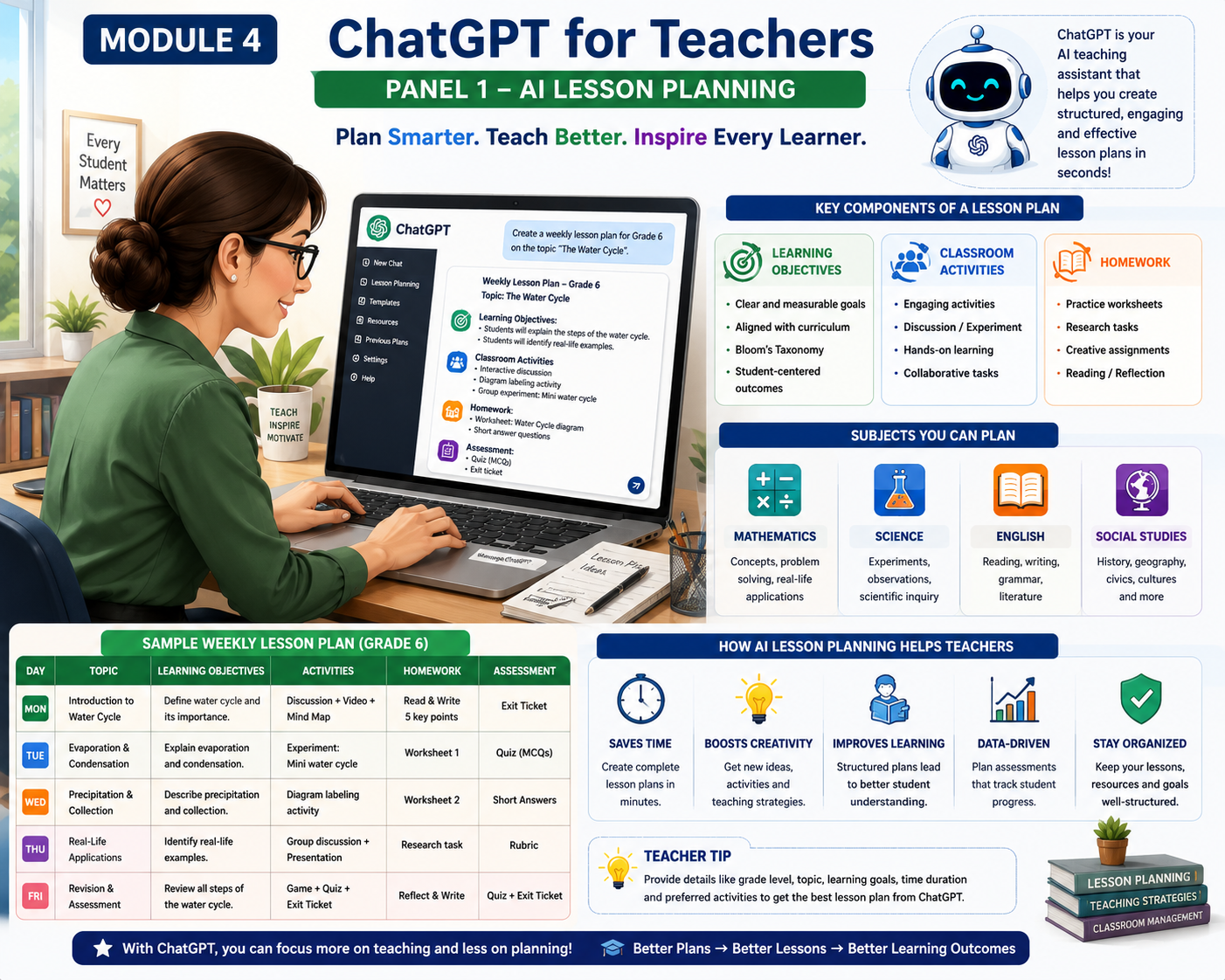
Every successful lesson begins with careful planning. A lesson plan provides a roadmap for teaching by outlining what students will learn, how they will learn it, and how their understanding will be assessed. Traditionally, preparing a high-quality lesson plan requires considerable time and effort.
ChatGPT can significantly reduce this workload by helping teachers generate structured lesson plans within minutes. It can suggest learning objectives, classroom activities, discussion questions, assessment methods, homework assignments, and teaching strategies aligned with different grade levels and subjects.
Rather than replacing the teacher’s expertise, ChatGPT provides a starting point that teachers can review, adapt, and personalize according to their students’ needs.
How ChatGPT Helps
ChatGPT can generate:
- Learning objectives
- Warm-up activities
- Classroom discussions
- Demonstrations
- Group work
- Independent practice
- Homework
- Exit tickets
- Assessment ideas
Example Prompt
Act as a Grade 5 science teacher. Create a 40-minute lesson plan on the water cycle. Include learning objectives, classroom activities, discussion questions, assessment, homework, and an exit ticket.
Example Output
- Introduction (5 minutes)
- Classroom Activity (15 minutes)
- Group Discussion (10 minutes)
- Quiz (5 minutes)
- Exit Ticket (5 minutes)
Classroom Activity
Create a lesson plan for any topic you teach.
Quick Quiz
What is the primary purpose of a lesson plan?
A. To entertain students
B. To organise teaching and learning
C. To replace textbooks
D. To create homework only
Key Takeaway
ChatGPT helps teachers create structured lesson plans quickly, allowing more time to focus on effective teaching and student engagement.
2 – Quiz Generator
Introduction
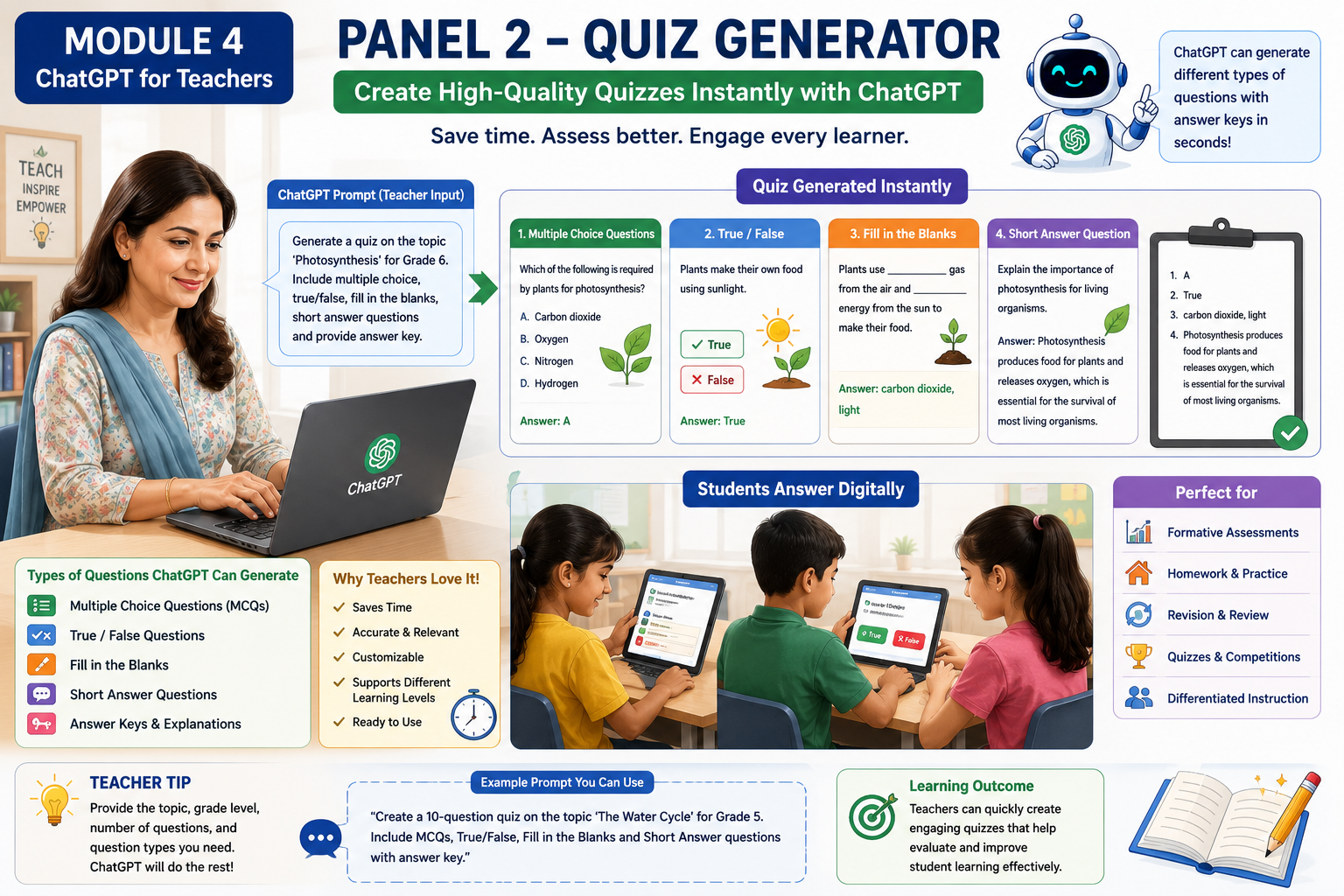
Assessment plays a vital role in measuring student learning. Creating quizzes manually can be repetitive and time-consuming. ChatGPT can instantly generate different types of assessment questions suitable for various grade levels and subjects.
Teachers can request multiple-choice questions, true/false statements, fill-in-the-blank exercises, short-answer questions, or higher-order thinking questions. ChatGPT can also provide answer keys and explanations, making quiz preparation more efficient.
Types of Quizzes
- Multiple Choice Questions (MCQs)
- True/False
- Fill in the Blanks
- Matching Questions
- Short Answers
- Essay Questions
Example Prompt
Create ten Grade 6 mathematics MCQs on fractions with an answer key.
Classroom Activity
Generate a five-question quiz for your subject.
Quick Quiz
Which question type is best for assessing factual recall?
Key Takeaway
ChatGPT helps teachers design assessments quickly while maintaining variety and alignment with learning objectives.
3 – Worksheet Creator
Introduction
Worksheets are one of the most commonly used teaching resources in classrooms. They help students practise new concepts, reinforce learning, and assess their understanding independently or in groups. Traditionally, designing high-quality worksheets takes considerable time, especially when teachers need different versions for various grade levels or learning abilities.
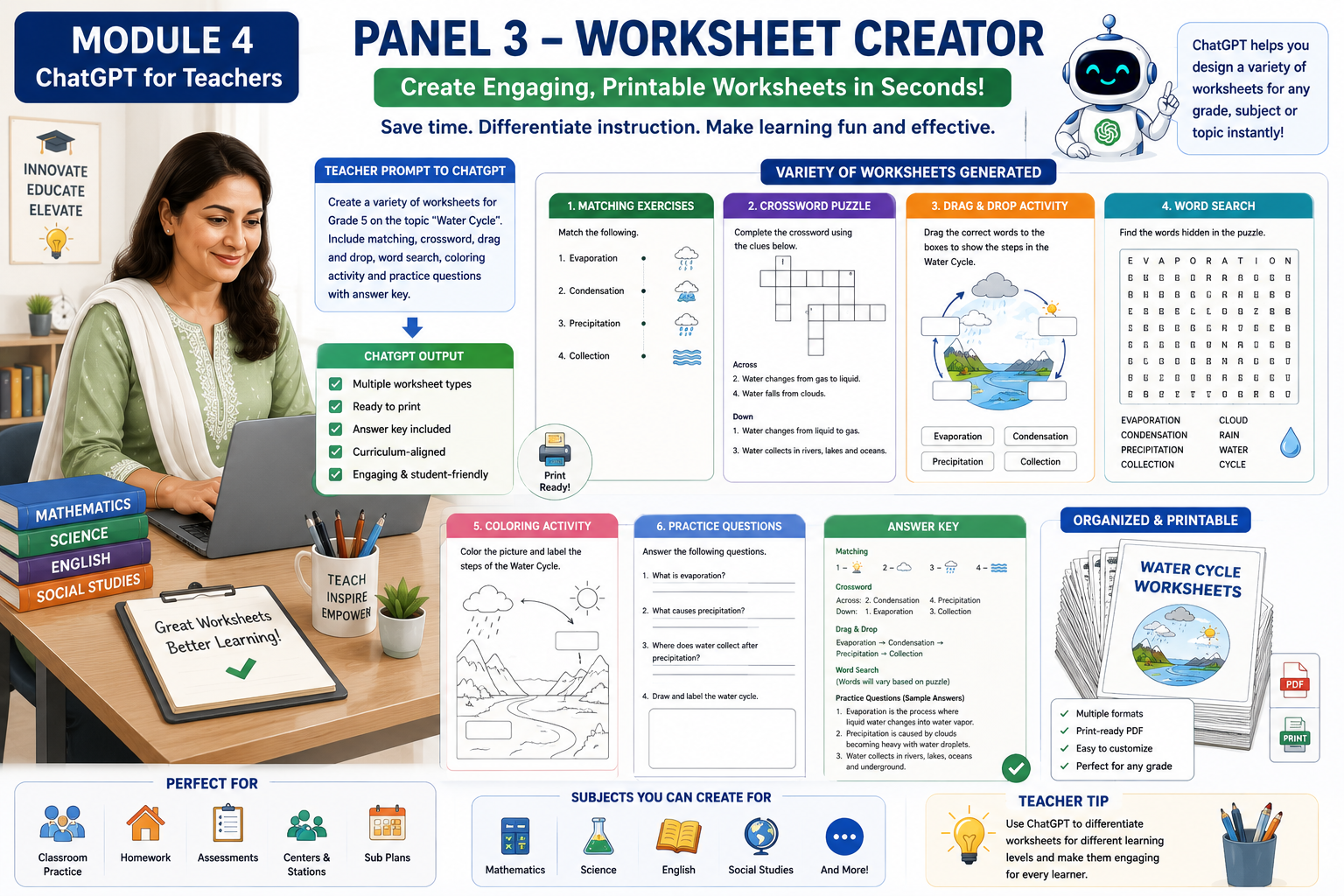
ChatGPT can assist teachers by generating a wide variety of worksheets within minutes. From simple matching activities to crossword puzzles and differentiated worksheets, ChatGPT provides a starting point that teachers can customize to suit their curriculum and students’ needs.
1. Printable Worksheets
Explanation
Printable worksheets are ready-to-use learning materials that students can complete using a pencil or pen. They are ideal for classroom activities, homework, revision, and assessments.
ChatGPT can create worksheets for almost any subject, including Mathematics, Science, English, Social Studies, Computer Science, and Languages.
Example
Grade 5 Science Worksheet
Topic: The Water Cycle
- Label the diagram.
- Define evaporation.
- Match the following terms.
- Answer three short questions.
Prompt
Act as a Grade 5 science teacher. Create a printable worksheet on the Water Cycle. Include labeling, multiple-choice questions, short-answer questions, and an answer key.
Classroom Activity
Create a printable worksheet for your favourite lesson using ChatGPT.
2. Matching Activities
Explanation
Matching activities help students connect related information. They improve memory, vocabulary, concept recognition, and critical thinking.
Students may match:
- Words with definitions
- Pictures with names
- Countries with capitals
- Animals with habitats
- Fractions with diagrams
- Historical figures with achievements
| A | B |
| Evaporation | Water changes into vapour |
| Condensation | Water vapour forms clouds |
| Precipitation | Rain falls from clouds |
Prompt
Create a Grade 4 matching worksheet about the Water Cycle with ten matching questions and an answer key.
Activity
Design a matching worksheet for one topic you teach.
3. Crossword Puzzles
Explanation
Crossword puzzles reinforce vocabulary while making learning enjoyable. Students solve clues and fill words into a crossword grid, helping improve spelling, recall, and subject-specific terminology.
Crosswords work particularly well for:
- Science
- Geography
- English
- History
- Computer Science
- Mathematics vocabulary
Example
Across
- Water changes into vapour.
Down
- Frozen water.
Prompt
Create a crossword puzzle for Grade 6 students using ten science vocabulary words about ecosystems.
Activity
Ask ChatGPT to generate a crossword using your chapter vocabulary.
4. Word Searches
Explanation
Word searches encourage students to identify and locate key vocabulary hidden within a grid of letters. These activities improve spelling, concentration, and visual recognition.
Example
Find the following words:
- Evaporation
- Cloud
- Rain
- Sun
- Ocean
- River
Prompt
Create a Grade 3 word search using vocabulary from the topic “Plants.”
Activity
Generate a word search for your next lesson.
5. Colouring Activities
Explanation
Colouring activities combine creativity with learning, making them especially valuable for younger learners. Students colour diagrams while identifying important parts, reinforcing understanding through visual engagement.
These activities are useful for:
- Science diagrams
- Maps
- Shapes
- Letters
- Numbers
- Animals
- Plants
Example
Colour the Water Cycle Diagram.
- Blue = Water
- Yellow = Sun
- Grey = Clouds
- Green = Trees
Prompt
Create a colouring worksheet for Grade 2 students showing the parts of a plant with simple colouring instructions.
Activity
Generate one colouring worksheet suitable for your classroom.
6. Drag-and-Drop Tasks
Explanation
Drag-and-drop activities are interactive digital exercises where students move objects to the correct locations on a screen. These tasks are commonly used in learning management systems and interactive platforms.
Examples include:
- Match words with pictures.
- Label a diagram.
- Sort animals into habitats.
- Arrange planets in order.
- Match equations with answers.
Example
Drag each label to the correct part of the Water Cycle.
- Evaporation
- Condensation
- Precipitation
- Collection
Prompt
Design a drag-and-drop activity where students label the stages of the Water Cycle.
Activity
Create one drag-and-drop exercise for your subject.
7. Practice Exercises
Explanation
Practice exercises provide students with opportunities to apply what they have learned. Regular practice builds confidence, strengthens understanding, and helps identify areas where additional support is needed.
Practice questions may include:
- Multiple-choice questions
- Fill-in-the-blanks
- Short answers
- Problem-solving
- Calculations
- Essays
Example
Mathematics
- Solve 45 × 8
- Divide 360 ÷ 9
- Simplify ¾ + ¼
Prompt
Generate fifteen Grade 5 mathematics practice questions on fractions with an answer key.
Activity
Create practice exercises for your next classroom lesson.
8. Differentiated Worksheets
Explanation
Not all students learn at the same pace or have the same level of prior knowledge. Differentiated worksheets allow teachers to provide learning activities that match students’ abilities, helping every learner succeed.
ChatGPT can create multiple versions of the same worksheet for different learning levels.
Example
Beginner
- Match pictures with words.
- Complete simple sentences. Answer basic questions.
Intermediate
- Solve application questions.
- Explain concepts in your own words.
- Complete short exercises.
Advanced
- Analyse real-world situations.
- Solve challenging problems.
- Write detailed explanations.
- Complete project-based tasks.
Prompt
Create three differentiated worksheets on fractions for Grade 5 students: beginner, intermediate, and advanced. Include answer keys for each version.
Activity
Choose one topic from your curriculum and create three versions of a worksheet to support learners with different ability levels.
Best Practices for Using ChatGPT to Create Worksheets
- Clearly specify the grade level, subject, and topic.
- Mention the worksheet type (e.g., matching, crossword, practice exercise).
- Request an answer key when appropriate.
- Tailor the difficulty level to your students.
- Review the generated content for accuracy and alignment with your curriculum before sharing it with students.
Quick Quiz
1. Which type of worksheet is most suitable for connecting related information?
A. Crossword Puzzle
B. Matching Activity
C. Colouring Activity
D. Practice Exercise
2. Which worksheet is particularly useful for reinforcing vocabulary through clues?
A. Word Search
B. Crossword Puzzle
C. Matching Activity
D. Practice Exercise
3. Why are differentiated worksheets valuable?
A. They reduce the number of lessons.
B. They provide the same task to every student.
C. They support learners with different ability levels.
D. They eliminate the need for assessment.
4. Which ChatGPT prompt is likely to produce the most useful worksheet?
A. Make a worksheet.
B. Create a Grade 5 mathematics worksheet on fractions with 10 practice questions, one matching activity, and an answer key.
C. Teach maths.
D. Write something about fractions.
Key Takeaway
ChatGPT can help teachers create a wide variety of worksheets—including printable worksheets, matching activities, crosswords, word searches, colouring activities, drag-and-drop tasks, practice exercises, and differentiated worksheets—in a fraction of the time it would take to create them manually. By combining clear prompts with teacher expertise, educators can produce engaging, curriculum-aligned learning materials that support diverse learners and make classroom instruction more effective.
4- Classroom Resources
Introduction
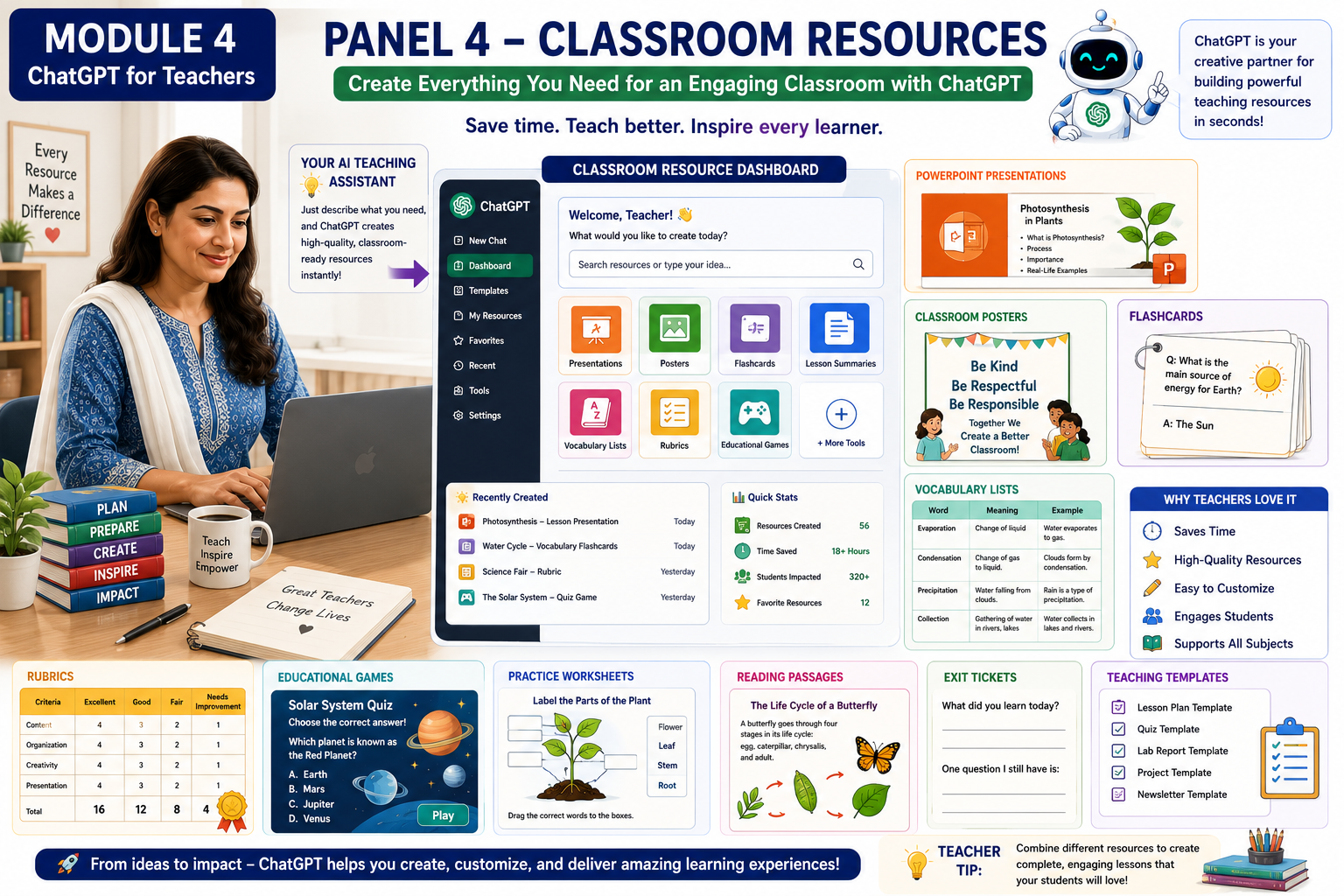
Effective teaching requires more than delivering a lesson. Teachers often prepare a variety of classroom resources to make learning engaging, organized, and meaningful. These resources include presentations, flashcards, posters, vocabulary lists, rubrics, lesson summaries, and educational games. Developing these materials manually can take many hours, especially when teaching multiple classes or subjects.
ChatGPT serves as a valuable teaching assistant by helping educators create high-quality classroom resources quickly and efficiently. With well-designed prompts, teachers can generate materials that support different teaching styles, learning objectives, and student needs. Rather than replacing the teacher’s expertise, ChatGPT provides a strong starting point that can be reviewed, customized, and adapted to suit the curriculum and classroom environment.
In this lesson, you will learn how ChatGPT can assist in creating a wide range of classroom resources that save preparation time while enhancing student engagement and learning outcomes.
PowerPoint Presentations
Explanation
Presentations help teachers explain concepts using text, images, diagrams, animations, and examples. A well-structured presentation keeps students focused and supports visual learning.
ChatGPT can help teachers generate presentation outlines, slide titles, speaker notes, discussion questions, and ideas for visuals. Teachers can then use tools such as PowerPoint, Google Slides, or Canva to design the final presentation.
Topic: The Water Cycle
Presentation Outline
- Slide 1: Introduction
- Slide 2: Learning Objectives
- Slide 3: Evaporation
- Slide 4: Condensation
- Slide 5: Precipitation
- Slide 6: Collection
- Slide 7: Class Activity
- Slide 8: Summary
- Slide 9: Quiz
Prompt
Act as a Grade 5 science teacher. Create a PowerPoint presentation outline on the Water Cycle with learning objectives, nine slides, speaker notes, and a classroom activity.
Classroom Activity
Choose one topic from your syllabus and use ChatGPT to create a presentation outline.
2. Classroom Posters
Explanation
Educational posters present important concepts in a simple and visually attractive format. They can reinforce classroom rules, scientific concepts, mathematical formulas, grammar rules, vocabulary, or motivational messages.
ChatGPT can generate poster titles, key points, slogans, and short explanations that can be converted into attractive classroom displays.
Example
Poster Title
The Water Cycle
- Evaporation
- Condensation
- Precipitation
- Collection
Include simple icons and colorful illustrations.
Prompt
Create educational content for a classroom poster explaining the Water Cycle for Grade 5 students using simple language.
Classroom Activity
Create one classroom poster for your next lesson.
3. Flashcards
Explanation
Flashcards are excellent tools for reviewing key concepts, vocabulary, formulas, dates, definitions, and facts. They encourage active recall and improve long-term memory.
ChatGPT can quickly generate sets of flashcards for almost any subject and grade level.
Example
Front
Evaporation
Back
The process by which water changes into water vapor due to heat.
Prompt
Generate twenty flashcards for Grade 6 Science on the topic “The Solar System.”
Classroom Activity
Create ten flashcards for a chapter you are currently teaching.
4. Vocabulary Lists
Explanation
Vocabulary lists introduce students to important words related to a lesson. They help learners understand new terminology and improve reading, writing, and communication skills.
ChatGPT can generate age-appropriate vocabulary lists with meanings, example sentences, pronunciation tips, and classroom activities.
Example
| Word | Meaning |
|---|---|
| Evaporation | Water changing into vapor |
| Condensation | Water vapor cooling into droplets |
| Precipitation | Rain, snow, or hail falling |
Prompt
Create a Grade 5 vocabulary list for the Water Cycle. Include definitions and example sentences.
Classroom Activity
Generate a vocabulary list for your next lesson and ask students to use each word in a sentence.
5. Rubrics
Explanation
A rubric is an assessment tool that describes the criteria used to evaluate student work. Rubrics help teachers grade fairly and consistently while providing students with clear expectations.
ChatGPT can generate rubrics for assignments, projects, presentations, essays, experiments, and classroom participation.
Example
| Criteria | Excellent | Good | Needs Improvement |
|---|---|---|---|
| Content | Accurate and complete | Mostly accurate | Incomplete |
| Organization | Well organized | Organized | Needs improvement |
| Creativity | Highly creative | Some creativity | Limited creativity |
Prompt
Create a grading rubric for a Grade 5 science project on the Water Cycle.
Classroom Activity
Develop a rubric for your next classroom assignment.
6. Educational Games
Explanation
Educational games transform learning into an enjoyable and interactive experience. They encourage participation, teamwork, problem-solving, and critical thinking while reinforcing classroom concepts.
ChatGPT can suggest game ideas suitable for different ages, subjects, and learning objectives.
Examples include:
- Quiz competitions
- Word games
- Role-playing activities
- Treasure hunts
- Classroom bingo
- Digital escape rooms
- Matching games
- Team challenges
Example
Science Bingo
Students mark science vocabulary words as the teacher reads definitions aloud.
Prompt
Create five educational games for teaching the Water Cycle to Grade 5 students.
Classroom Activity
Use ChatGPT to design one educational game for your classroom.
7. Lesson Summaries
Explanation
Lesson summaries help students review the most important ideas taught during a lesson. They reinforce understanding and prepare students for revision and assessment.
ChatGPT can produce concise summaries in different reading levels, making them suitable for diverse learners.
Example
Lesson Summary
The Water Cycle is the continuous movement of water through evaporation, condensation, precipitation, and collection. The Sun provides the energy that drives this natural process.
Prompt
Summarize a Grade 5 lesson on the Water Cycle in 150 words using simple language.
Classroom Activity
Ask ChatGPT to summarize your most recent lesson.
8. Discussion Questions
Explanation
Discussion questions encourage students to think critically, express their opinions, and apply their knowledge to real-life situations. They also promote collaboration and communication in the classroom.
ChatGPT can generate open-ended questions, inquiry-based discussions, and higher-order thinking questions that stimulate meaningful conversations.
Example
- Why is the Water Cycle important for life on Earth?
- What would happen if there were no evaporation?
- How does the Sun influence the Water Cycle?
- Can humans affect the Water Cycle? Explain.
Prompt
Generate ten higher-order discussion questions about the Water Cycle for Grade 5 students.
Classroom Activity
Use ChatGPT to prepare discussion questions for your next lesson and facilitate a classroom conversation.
Best Practices for Creating Classroom Resources
- Clearly specify the subject, grade level, and topic.
- Explain the purpose of the resource (teaching, revision, assessment, or enrichment).
- Request content that is appropriate for your students’ reading level.
- Ask for examples, visuals, or activities where appropriate.
- Always review and adapt AI-generated materials before using them in class.
Quick Quiz
1. Which classroom resource is most suitable for presenting information visually during a lesson?
A. Flashcards
B. PowerPoint Presentation
C. Rubric
D. Vocabulary List
2. What is the main purpose of a grading rubric?
A. To decorate the classroom
B. To organize teaching materials
C. To provide clear and consistent assessment criteria
D. To create homework
3. Which resource is especially useful for improving students’ memory through active recall?
A. Posters
B. Flashcards
C. Lesson Summaries
D. Discussion Questions
4. Why should teachers review ChatGPT-generated classroom resources before using them?
A. To ensure they are accurate, appropriate, and aligned with the curriculum
B. Because ChatGPT cannot create educational content
C. To make lessons longer
D. To avoid using classroom activities
Key Takeaway
ChatGPT helps teachers create a wide range of classroom resources, including presentations, posters, flashcards, vocabulary lists, rubrics, educational games, lesson summaries, and discussion questions. These resources save preparation time, improve lesson quality, and promote active student engagement. By combining AI-generated content with professional judgment, teachers can design meaningful, creative, and learner-centered classroom experiences.
5- Personalized Learning
Introduction
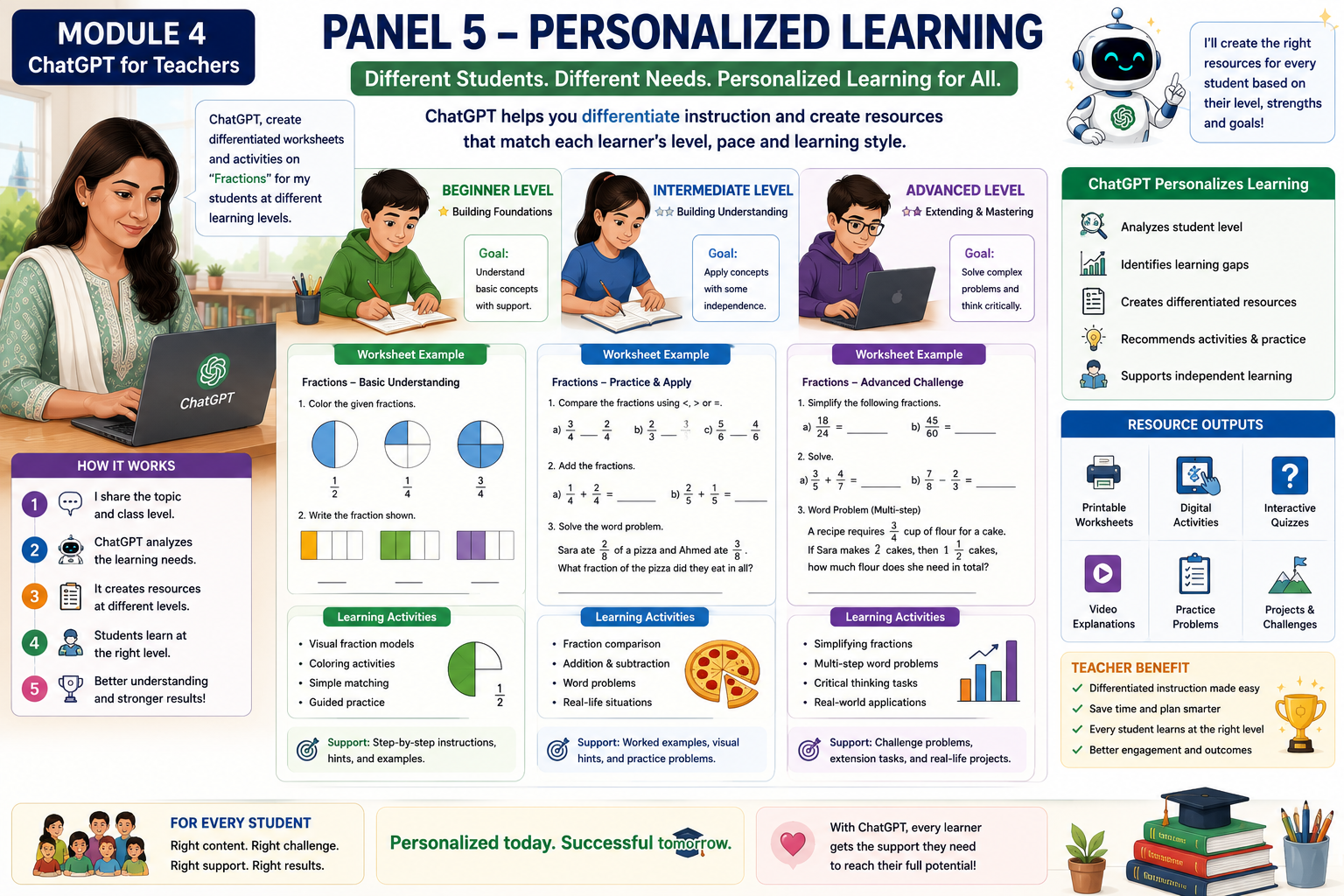
Every classroom is made up of students with different backgrounds, abilities, interests, and learning styles. While some students quickly understand new concepts, others may need additional explanations, extra practice, or alternative teaching methods. A single lesson or worksheet may not meet the needs of every learner.
Personalized learning is an instructional approach that adapts teaching, learning activities, and assessments to meet the individual needs of each student. Rather than expecting every learner to progress at the same pace, personalized learning recognizes that each student learns differently.
ChatGPT can assist teachers in creating differentiated learning materials, personalized practice activities, simplified explanations, extension tasks, and individualized feedback. This enables teachers to support struggling learners while also providing meaningful challenges for advanced students.
In this lesson, you will learn how ChatGPT can be used to personalize instruction, making learning more engaging, inclusive, and effective for every student.
1. Understanding Personalized Learning
Explanation
Personalized learning means adapting instruction to suit each learner’s strengths, needs, interests, and learning pace. Instead of using a one-size-fits-all approach, teachers provide different pathways for students to achieve the same learning objectives.
ChatGPT can generate multiple versions of the same lesson, allowing teachers to support learners with different abilities while maintaining consistent curriculum goals.
Example
Topic: Fractions
- Student A: Uses pictures and simple examples.
- Student B: Solves standard textbook questions.
- Student C: Applies fractions to real-life problem-solving situations.
Although each student completes different activities, all are working toward understanding fractions.
Prompt
Act as a Grade 5 mathematics teacher. Create three versions of a lesson on fractions for beginner, intermediate, and advanced learners.
Classroom Activity
Choose one lesson from your curriculum and create three versions using ChatGPT.
2. Supporting Beginner Learners
Explanation
Some students require additional support before they can master new concepts. Beginner learners benefit from simple language, visual aids, step-by-step instructions, and frequent practice opportunities.
ChatGPT can simplify difficult concepts without changing the learning objective.
Example
Instead of explaining the Water Cycle using scientific terminology, ChatGPT may generate:
“The Sun warms water in rivers and oceans. The water changes into tiny drops called water vapor. The vapor rises into the sky and forms clouds.”
Prompt
Explain the Water Cycle to a Grade 3 student using simple words, short sentences, and everyday examples.
Classroom Activity
Ask ChatGPT to simplify one difficult lesson from your textbook.
3. Supporting Intermediate Learners
Explanation
Intermediate learners have a good understanding of basic concepts and are ready for more challenging questions. They benefit from problem-solving, collaborative activities, and opportunities to explain their thinking.
ChatGPT can generate activities that encourage deeper understanding while reinforcing previously learned concepts.
Example
Students solve real-life fraction problems involving cooking, shopping, or measurement.
Prompt
Create five application-based questions on fractions for Grade 5 students.
Classroom Activity
Generate a worksheet that requires students to apply concepts in everyday situations.
4. Challenging Advanced Learners
Explanation
Advanced learners often complete classroom tasks quickly and need additional challenges to remain engaged. Providing enrichment activities encourages creativity, critical thinking, and independent learning.
ChatGPT can generate higher-order thinking questions, research tasks, projects, debates, and inquiry-based activities.
Example
Project
Investigate how climate change affects the Water Cycle and present your findings using a digital presentation.
Prompt
Design an enrichment project on the Water Cycle for advanced Grade 5 students. Include research questions, presentation guidelines, and assessment criteria.
Classroom Activity
Ask ChatGPT to create one extension activity for high-achieving students.
5. Differentiated Instruction
Explanation
Differentiated instruction means teaching the same topic using different methods and resources so that every student has an opportunity to succeed.
ChatGPT can generate differentiated:
- Worksheets
- Reading passages
- Practice questions
- Classroom activities
- Homework
- Assessments
This saves teachers significant preparation time while supporting diverse learning needs.
Example
Topic: Photosynthesis
Beginner
Label the parts of a plant.
Intermediate
Explain the process of photosynthesis in your own words.
Advanced
Analyze how environmental changes affect photosynthesis.
Prompt
Create differentiated classroom activities on photosynthesis for beginner, intermediate, and advanced learners.
Classroom Activity
Choose one chapter and create three differentiated classroom activities.
6. Personalized Feedback
Explanation
Feedback is most effective when it addresses each student’s individual strengths and areas for improvement. Generic comments often provide little guidance, whereas personalized feedback helps students understand what they did well and how they can improve.
ChatGPT can generate encouraging, constructive, and age-appropriate feedback comments based on student performance.
Example
Beginner
“You identified the main idea correctly. Let’s practice explaining your answer using complete sentences.”
Intermediate
“You demonstrated a good understanding of the topic. Try providing more detailed explanations to strengthen your answers.”
Advanced
“Excellent analysis. Consider supporting your conclusions with additional evidence and examples.”
Prompt
Generate personalized feedback comments for beginner, intermediate, and advanced students who completed a science worksheet.
Classroom Activity
Generate feedback comments for three students with different performance levels.
7. Adapting Learning Styles
Explanation
Students learn in different ways. Some understand best through visuals, while others prefer reading, discussion, or practical activities. Although students benefit from experiencing information in multiple ways, varying instructional methods can increase engagement and accessibility.
ChatGPT can help teachers create learning materials using different instructional approaches, such as:
- Visual diagrams
- Stories
- Hands-on activities
- Step-by-step explanations
- Real-life examples
- Discussion questions
- Interactive games
Example
Teaching the Solar System:
- Visual learner: Diagram of the planets.
- Reading-focused learner: Short informational passage.
- Hands-on learner: Build a model of the Solar System.
- Discussion activity: Compare Earth with Mars.
Prompt
Create four learning activities on the Solar System using visual, reading, discussion, and hands-on approaches.
Classroom Activity
Redesign one lesson using at least three different instructional methods.
8. Inclusive Learning
Explanation
Inclusive classrooms ensure that every student has equal opportunities to learn, regardless of ability, language background, or learning needs. Teachers often adapt instructional materials so that all learners can participate successfully.
ChatGPT can help create:
- Simplified reading passages
- Bilingual learning materials
- Vocabulary support
- Additional practice exercises
- Alternative assessment tasks
- Accessible classroom instructions
These adaptations help make learning more equitable and accessible.
Example
Create the same science worksheet in both English and Urdu with simple vocabulary.
Prompt
Rewrite this Grade 5 science worksheet using simpler language and provide bilingual vocabulary support.
Classroom Activity
Adapt one worksheet to make it more accessible for diverse learners.
Best Practices for Personalized Learning
- Clearly specify the grade level, subject, and topic.
- Describe the learner’s ability level.
- Request age-appropriate language and examples.
- Provide extension tasks for advanced learners.
- Review AI-generated materials before classroom use.
- Ensure all activities align with curriculum standards.
Quick Quiz
1. What is the primary goal of personalized learning?
A. Give every student the same worksheet.
B. Adapt learning to meet individual student needs.
C. Reduce classroom activities.
D. Replace teachers with AI.
2. Which learner is most likely to benefit from simplified explanations and visual examples?
A. Advanced learner
B. Beginner learner
C. University student
D. Teacher
3. What is differentiated instruction?
A. Teaching different subjects each day.
B. Using different teaching methods and resources to help all students achieve the same learning goals.
C. Giving only advanced students additional work.
D. Using only digital resources.
4. How can ChatGPT support personalized learning?
A. By generating one identical lesson for every student.
B. By creating learning materials, activities, and feedback tailored to different ability levels and needs.
C. By replacing classroom instruction.
D. By grading examinations automatically without teacher review.
Key Takeaway
Personalized learning recognizes that every student learns differently. ChatGPT helps teachers create differentiated lessons, customized worksheets, personalized feedback, and engaging activities that support learners at different ability levels. When combined with professional teaching expertise, AI enables educators to build more inclusive, student-centered classrooms where every learner has the opportunity to succeed.
6- Assessment and feedback
Introduction
Assessment is an essential part of the teaching and learning process. It helps teachers determine what students have learned, identify areas where they need additional support, and measure progress toward learning objectives. Equally important is feedback, which provides students with clear guidance on their strengths, areas for improvement, and the next steps in their learning journey.
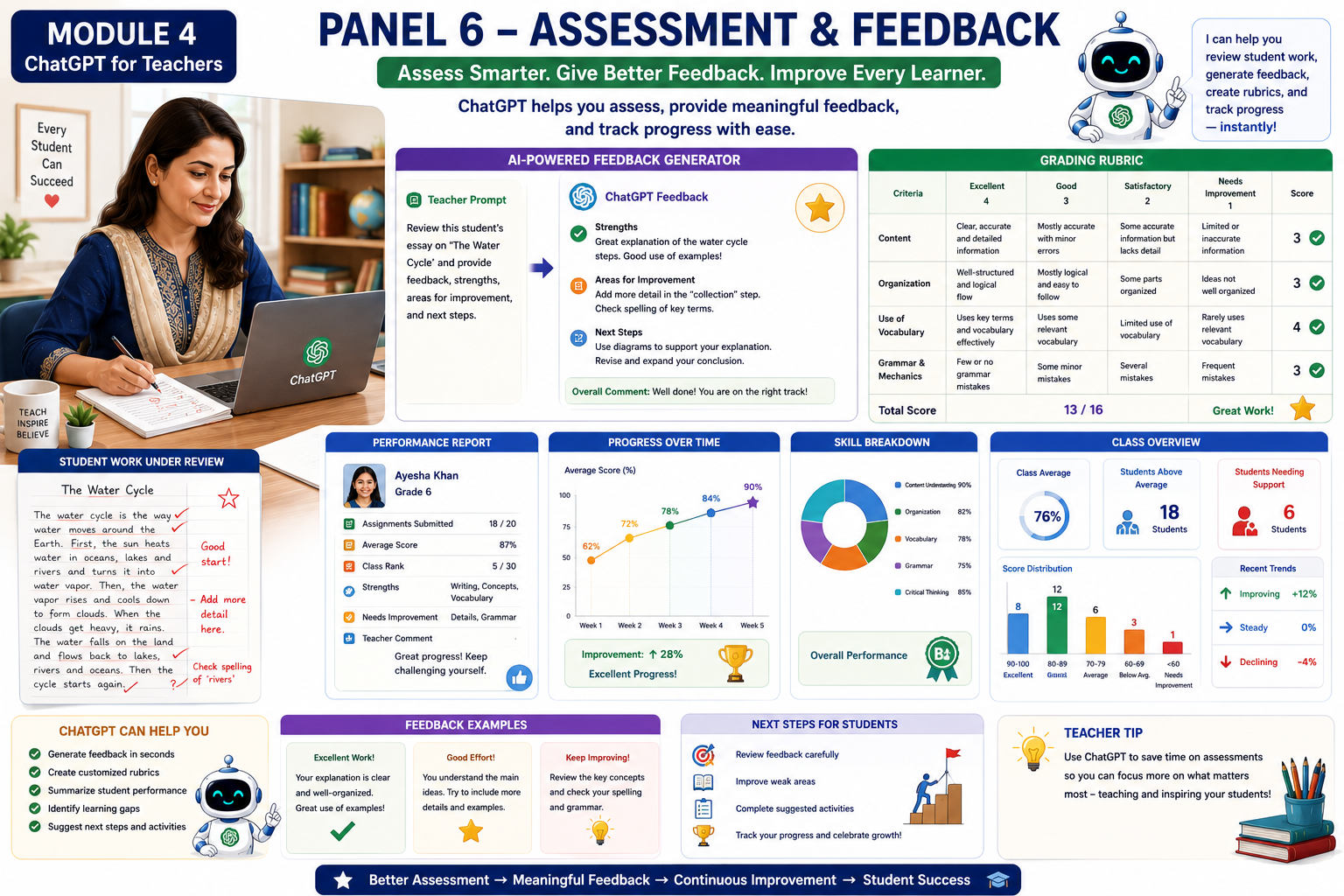
Preparing assessments, grading student work, and writing meaningful feedback can be time-consuming, particularly for teachers managing multiple classes. ChatGPT can assist by generating quizzes, rubrics, feedback comments, performance reports, and progress summaries. While AI can streamline many routine tasks, teachers remain responsible for reviewing, verifying, and personalizing the results to ensure they are accurate, fair, and aligned with curriculum standards.
In this lesson, you will explore how ChatGPT can support assessment and feedback, helping teachers save time while promoting student growth and continuous improvement.
1. Creating Assessments
Explanation
Assessments measure students’ understanding of concepts, skills, and learning outcomes. They help teachers identify learning gaps and determine whether instructional objectives have been achieved.
ChatGPT can generate a variety of assessments suitable for different grade levels and subjects.
These include:
- Multiple-choice questions (MCQs)
- True/False questions
- Fill-in-the-blanks
- Short-answer questions
- Essay questions
- Case studies
- Problem-solving tasks
- Practical activities
Teachers can also request answer keys and explanations to support grading.
Example
Topic: Photosynthesis
Assessment
- What is photosynthesis?
- Which gas do plants absorb during photosynthesis?
- Explain why sunlight is important for photosynthesis.
Prompt
Act as a Grade 6 science teacher. Create a 10-question assessment on photosynthesis. Include multiple-choice questions, short-answer questions, and an answer key.
Classroom Activity
Generate an assessment for one chapter you are currently teaching.
2. Designing Grading Rubrics
Explanation
A grading rubric is a scoring guide that outlines the criteria used to evaluate student work. Rubrics help ensure consistency, fairness, and transparency in assessment.
ChatGPT can generate rubrics for assignments, projects, presentations, essays, laboratory reports, and classroom participation.
Example
| Criteria | Excellent (4) | Good (3) | Satisfactory (2) | Needs Improvement (1) |
|---|---|---|---|---|
| Content Knowledge | Accurate, complete, and detailed | Mostly accurate | Basic understanding | Limited understanding |
| Organization | Well-organized | Organized | Some organization | Disorganized |
| Creativity | Highly creative | Creative | Some creativity | Minimal creativity |
| Presentation | Clear and engaging | Mostly clear | Adequate | Difficult to follow |
Prompt
Create a grading rubric for a Grade 5 science presentation on the Water Cycle.
Classroom Activity
Develop a rubric for your next classroom assignment.
3. Generating Constructive Feedback
Explanation
Constructive feedback helps students recognize what they have done well and what they can improve. Effective feedback is specific, encouraging, and focused on learning rather than simply assigning a grade.
ChatGPT can generate personalized feedback comments for students with different levels of performance.
Example
Excellent Performance
“Excellent work! Your explanations are clear, accurate, and supported by relevant examples. Continue applying these strong analytical skills.”
Average Performance
“You have demonstrated a good understanding of the topic. Review the key concepts and include more detail in your explanations.”
Needs Improvement
“You have made a good start. Focus on understanding the basic concepts and practice with additional examples. With continued effort, your understanding will improve.”
Prompt
Generate constructive feedback comments for students who scored 90%, 70%, and 50% on a science assessment.
Classroom Activity
Use ChatGPT to create feedback comments for three different levels of student achievement.
4. Performance Reports
Explanation
Performance reports summarize students’ academic progress over a specific period. They help teachers communicate achievements, strengths, challenges, and recommendations to students and parents.
ChatGPT can assist in drafting clear and professional performance summaries.
Example
Student Performance Report
Student: Sarah
Strengths
- Participates actively in class.
- Demonstrates strong problem-solving skills.
- Completes assignments on time.
Areas for Improvement
- Improve scientific vocabulary.
- Expand written explanations.
Recommendation
Continue practicing higher-order thinking questions and participate in group discussions.
Prompt
Write a professional performance report for a Grade 5 student who performs well in mathematics but needs improvement in written communication.
Classroom Activity
Generate a performance report using fictional student data.
5. Progress Charts and Learning Analytics
Explanation
Tracking student progress helps teachers identify trends, monitor improvement, and provide timely support. Visual representations such as charts and graphs make it easier to analyze learning outcomes over time.
Although ChatGPT does not generate charts directly within a chat, it can organize assessment data, summarize trends, and recommend appropriate chart types that can be created using spreadsheet software or educational tools.
Example
Progress Summary
| Assessment | Score |
|---|---|
| Quiz 1 | 65% |
| Quiz 2 | 72% |
| Quiz 3 | 81% |
| Final Assessment | 90% |
Observation
The student demonstrates consistent improvement throughout the unit.
Prompt
Analyze the following assessment scores and write a progress summary highlighting strengths, challenges, and recommendations.
Classroom Activity
Provide sample student scores and ask ChatGPT to summarize learning progress.
6. Identifying Learning Gaps
Explanation
Learning gaps occur when students have not fully understood specific concepts or skills. Early identification allows teachers to provide targeted support before misunderstandings become larger obstacles.
ChatGPT can analyze student responses and suggest topics that require reteaching or additional practice.
Example
Assessment Results
- Fractions: 90%
- Decimals: 85%
- Percentages: 52%
Recommendation
Provide additional lessons and practice activities on percentages before introducing more advanced concepts.
Prompt
Analyze these mathematics assessment results and identify learning gaps. Suggest classroom interventions.
Classroom Activity
Use a fictional assessment dataset to identify areas requiring additional instruction.
7. Supporting Self-Assessment and Peer Assessment
Explanation
Assessment is not limited to teacher evaluation. Students can also reflect on their own learning (self-assessment) and provide constructive feedback to classmates (peer assessment). These approaches encourage responsibility, critical thinking, and collaboration.
ChatGPT can generate reflection questions, self-assessment checklists, and peer review forms.
Example
Self-Assessment Checklist
- I understand today’s lesson.
- I can explain the main concepts.
- I completed all classroom activities.
- I know which areas I need to practice.
Prompt
Create a student self-assessment checklist for a Grade 5 science lesson on ecosystems.
Classroom Activity
Develop a self-assessment checklist for your next lesson.
8. Ethical Use of AI in Assessment
Explanation
While ChatGPT can assist with creating assessments and feedback, teachers should use AI responsibly. Assessment decisions should always involve professional judgment. Teachers must review AI-generated content for accuracy, fairness, inclusivity, and alignment with curriculum standards.
Student privacy should also be protected. Avoid entering confidential or personally identifiable student information into AI tools unless permitted by your school’s policies and applicable privacy regulations.
Best Practices
- Review all AI-generated assessments before use.
- Ensure questions align with learning objectives.
- Provide personalized feedback rather than copying AI responses without review.
- Protect student privacy and confidentiality.
- Use AI as a teaching assistant—not as a replacement for professional judgment.
Quick Quiz
1. What is the primary purpose of assessment?
A. To assign grades only
B. To measure student learning and identify areas for improvement
C. To reduce classroom activities
D. To replace teaching
2. What is the main benefit of using a grading rubric?
A. It decorates student work.
B. It provides clear and consistent assessment criteria.
C. It replaces teacher feedback.
D. It shortens lessons.
3. Which statement best describes effective feedback?
A. It only tells students their score.
B. It is specific, constructive, and guides improvement.
C. It focuses only on mistakes.
D. It is identical for every student.
4. Why should teachers review AI-generated assessments and feedback?
A. Because AI-generated content may need adjustments for accuracy, fairness, and curriculum alignment.
B. Because AI cannot generate educational materials.
C. To make assessments more difficult.
D. To avoid using rubrics.
Key Takeaway
Assessment and feedback are essential for improving student learning and guiding instructional decisions. ChatGPT can help teachers create assessments, design grading rubrics, generate constructive feedback, draft performance reports, analyze learning progress, and identify learning gaps. When combined with professional expertise and ethical practices, AI enables teachers to deliver timely, meaningful, and personalized assessment that supports every learner’s success.
7- Real Life Classroom Example
Introduction
Understanding individual AI tools is valuable, but the real benefit of ChatGPT becomes clear when teachers use it throughout an entire lesson. From planning a lesson to assessing student learning, ChatGPT can support many teaching tasks while allowing teachers to focus on meaningful classroom interactions.
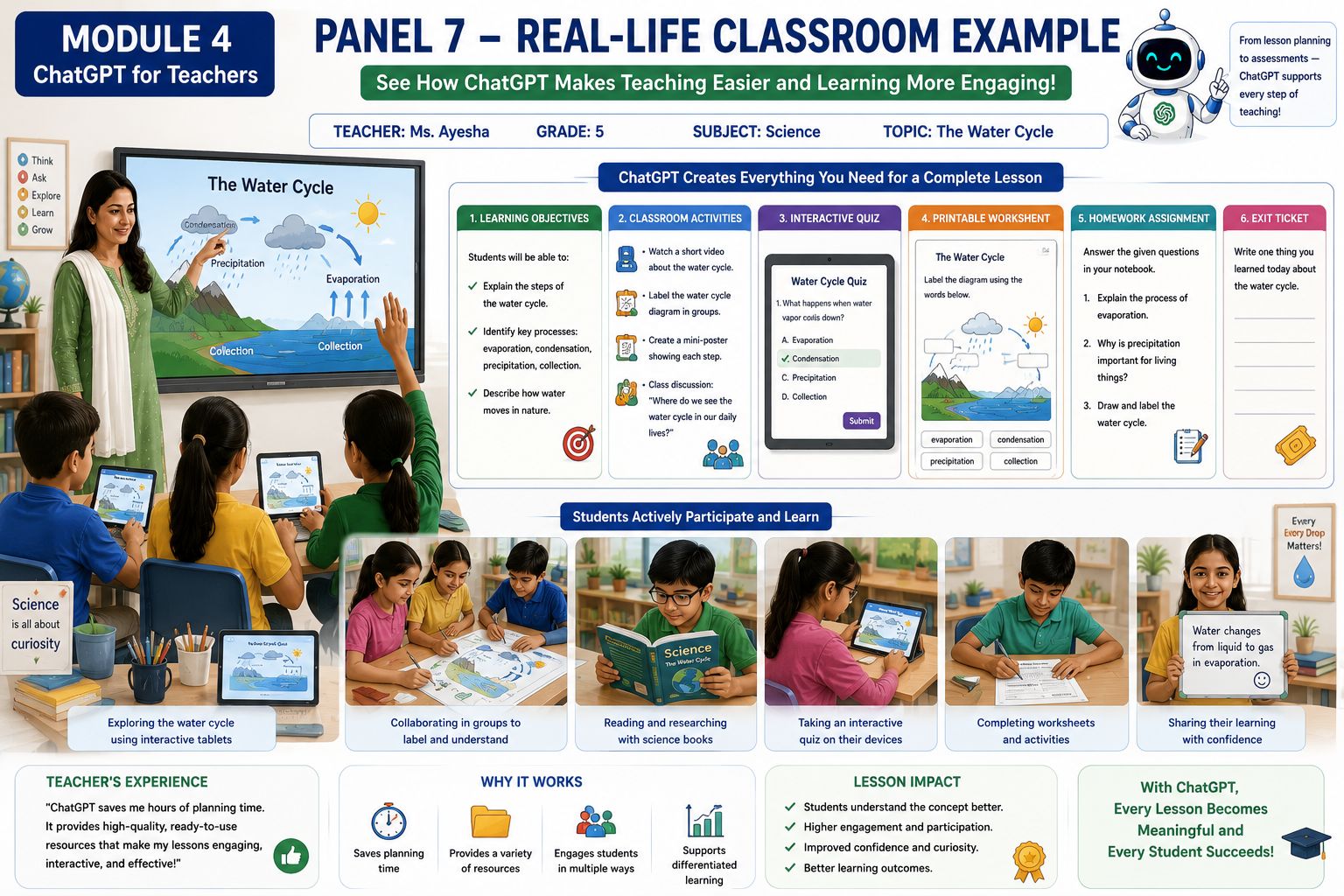
In this lesson, you will explore a real-life classroom scenario involving a Grade 5 Science lesson on The Water Cycle. The example demonstrates how a teacher can use ChatGPT before, during, and after a lesson to create instructional materials, engage students in learning activities, assess understanding, and provide constructive feedback.
This example illustrates that ChatGPT is not a replacement for the teacher. Instead, it acts as a professional teaching assistant that helps reduce preparation time and supports effective teaching practices.
Classroom Scenario
Teacher
Ms. Sarah, a Grade 5 Science teacher
Subject
Science
Topic
The Water Cycle
Class Duration
40 Minutes
Learning Goal
Students will understand the stages of the Water Cycle and explain how water continuously moves through nature.
Step 1: Planning the Lesson
Explanation
Before entering the classroom, the teacher uses ChatGPT to prepare a complete lesson plan. Instead of spending several hours organizing instructional materials, the teacher provides a detailed prompt and receives a structured lesson outline within minutes.
Prompt
Act as a Grade 5 Science teacher. Create a 40-minute lesson plan on the Water Cycle. Include learning objectives, classroom activities, discussion questions, assessment, homework, and an exit ticket.
ChatGPT Generates
- Lesson objectives
- Introduction
- Teaching strategy
- Classroom discussion
- Group activity
- Assessment questions
- Homework
- Exit ticket
Step 2: Preparing Classroom Resources
Explanation
Once the lesson plan is complete, the teacher asks ChatGPT to prepare supporting classroom materials that make the lesson more engaging and interactive.
ChatGPT Creates
- PowerPoint presentation outline
- Printable worksheet
- Vocabulary list
- Flashcards
- Classroom poster
- Interactive quiz
- Discussion questions
These resources help students understand the lesson through multiple learning activities.
Prompt
Create classroom resources for a Grade 5 lesson on the Water Cycle. Include a presentation outline, printable worksheet, flashcards, vocabulary list, and classroom discussion questions.
Step 3: Teaching the Lesson
Explanation
During the lesson, the teacher guides students through the learning process while using the AI-generated resources to support instruction.
Classroom Activities
- Introduce the Water Cycle using a presentation.
- Display a classroom poster.
- Explain key vocabulary.
- Ask students questions.
- Conduct a group discussion.
- Demonstrate evaporation using a simple classroom experiment.
- Encourage students to share observations.
Although ChatGPT helped prepare the resources, the teacher remains responsible for explaining concepts, answering questions, and facilitating learning.
Step 4: Student Learning Activities
Explanation
Students actively participate instead of simply listening to the teacher.
Students Complete
- Printable worksheet
- Vocabulary activity
- Label the Water Cycle diagram
- Interactive quiz
- Group discussion
- Pair activity
- Question-and-answer session
Students use tablets, textbooks, notebooks, and classroom displays to complete activities and collaborate with classmates.
Step 5: Classroom Assessment
Explanation
At the end of the lesson, the teacher evaluates student understanding using AI-generated assessment materials.
Assessment Includes
- Five multiple-choice questions
- Two short-answer questions
- Diagram labeling activity
- Exit ticket
Example Exit Ticket
Write one new thing you learned today about the Water Cycle.
This helps the teacher quickly identify whether students achieved the lesson objectives.
Step 6: Homework Assignment
Explanation
To reinforce classroom learning, the teacher assigns meaningful homework generated with ChatGPT.
Homework Example
- Draw and label the Water Cycle.
- Explain each stage in your own words.
- Observe where you see evaporation or condensation at home and record your observations.
Prompt
Create a Grade 5 homework assignment on the Water Cycle with clear instructions and an answer guide.
Step 7: Reviewing Student Work
Explanation
After collecting assignments, the teacher reviews student work. ChatGPT assists by suggesting constructive feedback, performance summaries, and grading rubrics.
ChatGPT Helps Generate
- Personalized feedback comments
- Grading rubric
- Performance report
- Suggestions for improvement
Example Feedback
Excellent Work
“You accurately explained all stages of the Water Cycle and supported your answers with clear examples.”
Needs Improvement
“You understand the basic concepts. Review condensation and precipitation, then complete the additional practice worksheet.”
The teacher reviews and personalizes these comments before sharing them with students.
Step 8: Reflection and Future Planning
Explanation
Effective teachers reflect on every lesson to identify successes and opportunities for improvement.
ChatGPT can assist by summarizing classroom observations and suggesting ideas for future lessons.
Reflection Questions
- Which activities engaged students the most?
- Which concepts were difficult?
- What should be reviewed next lesson?
- How can learning be improved?
Prompt
Based on today’s Grade 5 Water Cycle lesson, suggest improvements for the next lesson and recommend extension activities for advanced learners.
Complete AI Workflow
This classroom example demonstrates how ChatGPT can support teachers throughout the teaching process.
Before Class
- Lesson planning
- Presentation preparation
- Worksheet creation
- Quiz generation
- Vocabulary lists
- Classroom resources
During Class
- Interactive teaching
- Student discussions
- Learning activities
- Question-and-answer sessions
- Collaborative learning
After Class
- Assessment
- Feedback
- Performance reports
- Homework
- Lesson reflection
- Future planning
Best Practices
- Use ChatGPT to save preparation time, but always review the content before teaching.
- Adapt AI-generated materials to match your curriculum and students’ needs.
- Encourage active learning rather than relying solely on AI-generated resources.
- Maintain student privacy by avoiding the use of confidential information.
- Combine AI assistance with your professional expertise and classroom experience.
Classroom Activity
Choose a lesson from your own subject and use ChatGPT to create:
- Learning objectives
- Lesson plan
- PowerPoint outline
- Worksheet
- Classroom activity
- Quiz
- Homework
- Exit ticket
- Feedback comments
Present your lesson to a colleague or practice teaching it.
Quick Quiz
1. What is the teacher’s primary role when using ChatGPT in the classroom?
A. Allow ChatGPT to teach the lesson independently.
B. Use ChatGPT as a teaching assistant while guiding and facilitating student learning.
C. Replace all classroom resources with AI.
D. Use ChatGPT only for grading.
2. Which task is typically completed before the lesson begins?
A. Reviewing homework
B. Creating a lesson plan and classroom resources
C. Providing feedback
D. Recording final grades
3. Why is an exit ticket useful?
A. It entertains students before they leave.
B. It helps the teacher quickly assess what students learned during the lesson.
C. It replaces homework.
D. It records attendance.
4. Which statement best describes the role of ChatGPT in this classroom example?
A. It replaces the teacher’s professional judgment.
B. It supports planning, teaching, assessment, and feedback while the teacher remains responsible for instructional decisions.
C. It automatically grades all student work without review.
D. It removes the need for lesson planning.
Key Takeaway
This real-life classroom example demonstrates how ChatGPT can support teachers at every stage of the teaching process—from lesson planning and resource creation to classroom instruction, assessment, feedback, and reflection. When used responsibly, ChatGPT helps teachers save time, enhance lesson quality, and create engaging, student-centered learning experiences. However, effective teaching still depends on the teacher’s expertise, creativity, and professional judgment to ensure that AI-generated content is accurate, appropriate, and meaningful for every learner.
8- Key Benefits
Introduction
Teaching is one of the most rewarding professions, but it also involves significant planning, preparation, assessment, and administrative responsibilities. Teachers often spend many hours creating lesson plans, preparing classroom resources, grading assignments, and providing feedback. These tasks, while essential, can reduce the time available for direct interaction with students.
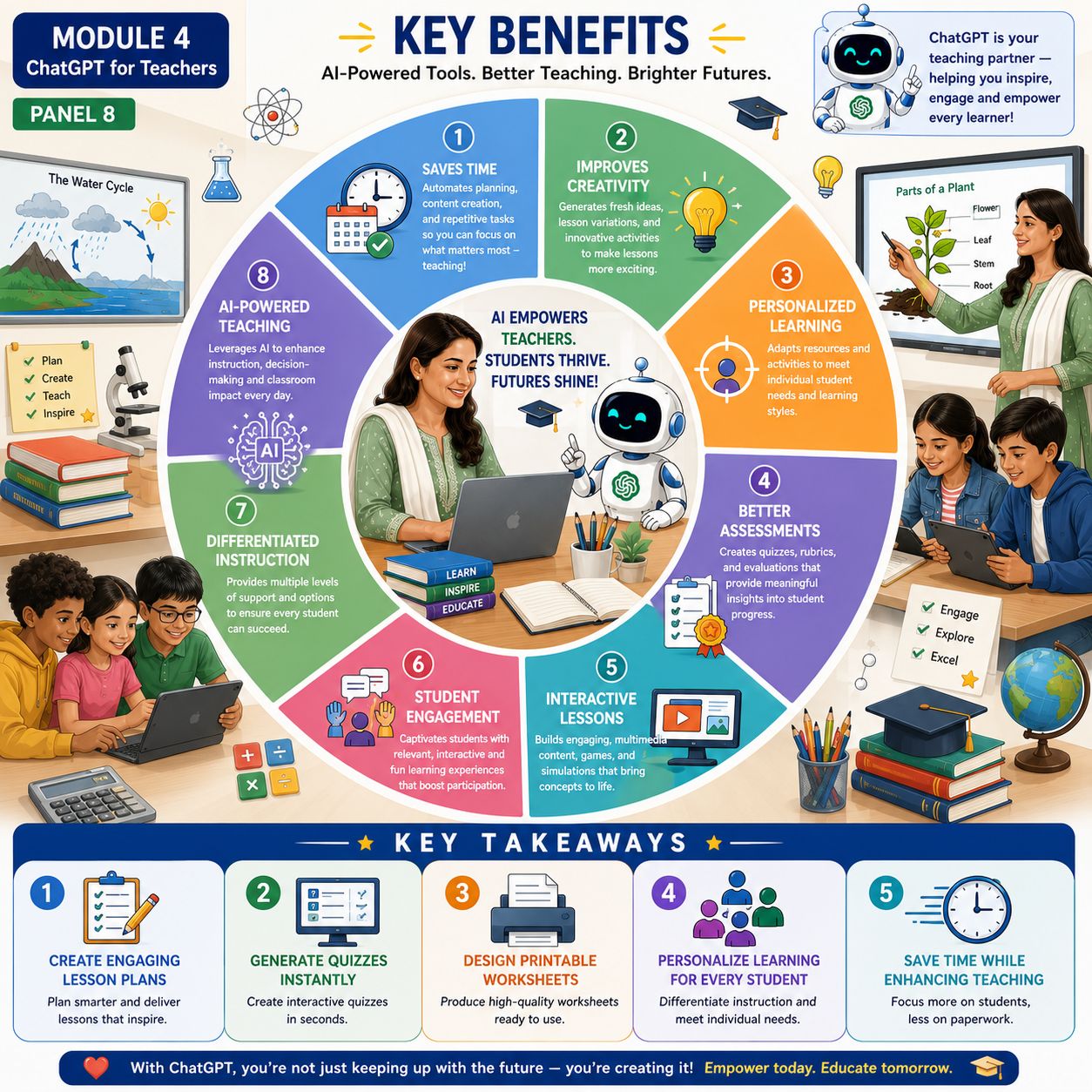
ChatGPT can serve as an AI teaching assistant that supports educators throughout the teaching and learning process. It helps teachers generate ideas, prepare instructional materials, personalize learning experiences, and streamline routine tasks. By automating repetitive work, ChatGPT enables teachers to devote more time to inspiring students, facilitating discussions, and creating meaningful learning experiences.
It is important to remember that ChatGPT does not replace teachers. The teacher remains the decision-maker, selecting, reviewing, and adapting AI-generated content to ensure it meets curriculum requirements, supports learning objectives, and reflects the unique needs of students.
In this lesson, you will explore the key benefits of ChatGPT and discover how it can enhance teaching while maintaining the central role of the educator.
1. Saves Time
Explanation
One of the greatest advantages of ChatGPT is its ability to reduce the time teachers spend on routine preparation. Tasks that previously required hours—such as writing lesson plans, preparing quizzes, designing worksheets, and drafting classroom activities—can often be completed in minutes.
This saved time allows teachers to focus on student interaction, lesson delivery, classroom management, and professional development.
Example
A teacher needs tomorrow’s lesson on fractions.
Instead of spending two hours preparing materials, the teacher asks ChatGPT to generate:
- A lesson plan
- A worksheet
- A quiz
- Homework
- An exit ticket
The teacher then reviews and customizes the materials before using them in class.
Prompt
Create a complete Grade 5 mathematics lesson on fractions, including a lesson plan, worksheet, quiz, homework, and exit ticket.
Classroom Activity
Choose a topic from your subject and use ChatGPT to prepare all teaching materials in one session.
2. Improves Creativity
Explanation
Planning engaging lessons requires creativity. ChatGPT can generate fresh teaching ideas, real-world examples, storytelling activities, classroom discussions, educational games, and project-based learning experiences.
These suggestions help teachers move beyond traditional lectures and create more engaging, student-centered lessons.
Example
Instead of simply explaining ecosystems, ChatGPT suggests:
- A classroom role-play
- A nature observation activity
- A debate on environmental conservation
- A group poster project
- A digital storytelling assignment
Prompt
Suggest five creative classroom activities for teaching ecosystems to Grade 6 students.
Classroom Activity
Ask ChatGPT to generate three creative teaching ideas for your next lesson.
3. Personalized Learning
Explanation
Students have different abilities, interests, and learning needs. ChatGPT helps teachers create differentiated learning materials by generating multiple versions of lessons, worksheets, and assessments for beginner, intermediate, and advanced learners.
This ensures that every student receives appropriate support and challenge.
Example
Topic: Decimals
Beginner
Simple practice questions with visual models.
Intermediate
Word problems using decimals.
Advanced
Real-world financial calculations involving decimals.
Prompt
Create differentiated learning activities on decimals for beginner, intermediate, and advanced learners.
Classroom Activity
Adapt one classroom lesson for three different learning levels.
4. Better Assessments
Explanation
Assessment is more effective when it measures understanding through a variety of question types and provides meaningful feedback. ChatGPT helps teachers create balanced assessments, answer keys, grading rubrics, and constructive feedback comments.
This improves consistency while reducing the time required for assessment preparation.
Example
Generate:
- Ten multiple-choice questions
- Three short-answer questions
- One project rubric
- Personalized feedback comments
Prompt
Create a balanced Grade 5 science assessment on the Water Cycle, including a rubric and answer key.
Classroom Activity
Use ChatGPT to design an assessment for your next classroom topic.
5. Interactive Lessons
Explanation
Interactive lessons encourage students to participate actively rather than passively listening to information. ChatGPT can suggest activities that promote collaboration, discussion, inquiry, and hands-on learning.
Examples include:
- Role-playing
- Classroom debates
- Problem-solving challenges
- Simulations
- Group investigations
- Educational games
Interactive learning increases student participation and helps learners retain knowledge more effectively.
Example
Science Escape Challenge
Students solve science questions to unlock the next stage of the classroom activity.
Prompt
Design an interactive classroom activity for Grade 5 students learning about the Solar System.
Classroom Activity
Create one interactive activity using ChatGPT and test it in your classroom.
6. Student Engagement
Explanation
Students are more motivated when lessons are interesting, relevant, and participatory. ChatGPT helps teachers generate real-life examples, discussion questions, storytelling activities, and collaborative tasks that capture students’ attention.
Engaged students are more likely to participate, ask questions, and retain new knowledge.
Example
Instead of reading a textbook passage, students investigate why different climates receive different amounts of rainfall and present their findings to the class.
Prompt
Suggest engaging classroom activities that help Grade 5 students understand climate and weather.
Classroom Activity
Ask ChatGPT to transform a traditional lesson into an engaging classroom experience.
7. Differentiated Instruction
Explanation
Differentiated instruction recognizes that students learn in different ways and at different speeds. ChatGPT supports teachers by generating alternative explanations, modified worksheets, extension activities, and additional practice for learners with different abilities.
This helps teachers provide equitable learning opportunities while maintaining common learning objectives.
Example
Topic: Multiplication
Beginner
Use pictures and repeated addition.
Intermediate
Solve multiplication word problems.
Advanced
Apply multiplication to budgeting and business scenarios.
Prompt
Generate differentiated mathematics activities for Grade 4 multiplication.
Classroom Activity
Create three versions of one classroom activity using ChatGPT.
8. AI-Powered Teaching
Explanation
AI-powered teaching combines the strengths of technology with the expertise of professional educators. ChatGPT assists with planning, resource development, assessment, and organization, while teachers continue to make instructional decisions and build meaningful relationships with students.
Successful AI integration depends on responsible use, careful review of generated content, and professional judgment.
Example
A teacher uses ChatGPT to prepare:
- Weekly lesson plans
- Classroom resources
- Assessments
- Feedback comments
The teacher reviews all materials, adapts them to the curriculum, and delivers engaging classroom instruction.
Prompt
Help me organize one week of Grade 5 science lessons, including lesson plans, classroom activities, assessments, and homework.
Classroom Activity
Use ChatGPT to organize one week’s teaching schedule for your subject.
Best Practices for Using ChatGPT
- Write clear and specific prompts.
- Review AI-generated content before using it.
- Adapt materials to your students’ learning needs.
- Align all resources with curriculum standards.
- Protect student privacy by avoiding confidential information.
- Use AI to support—not replace—professional teaching expertise.
Quick Quiz
1. What is one of the biggest advantages of ChatGPT for teachers?
A. It replaces classroom teaching.
B. It saves preparation time.
C. It grades examinations without review.
D. It eliminates lesson planning.
2. How does ChatGPT support personalized learning?
A. By giving every student the same worksheet.
B. By generating learning materials for different ability levels.
C. By replacing classroom activities.
D. By teaching students independently.
3. Why should teachers review AI-generated content?
A. To ensure accuracy, curriculum alignment, and appropriateness for students.
B. To make lessons longer.
C. To avoid using educational technology.
D. To replace learning objectives.
4. Which statement best describes AI-powered teaching?
A. AI replaces the teacher.
B. AI supports teachers with planning and resource creation while teachers remain responsible for instruction and decision-making.
C. AI removes the need for assessments.
D. AI eliminates classroom interaction.
Module 4 Summary
Throughout this module, you have explored how ChatGPT can support teachers in nearly every stage of the teaching process. From planning lessons and creating classroom resources to designing assessments, personalizing instruction, and providing meaningful feedback, AI can help educators work more efficiently while enhancing the quality of teaching and learning.
However, the most effective use of ChatGPT occurs when it is viewed as a teaching assistant rather than a replacement for the teacher. Professional judgment, subject expertise, ethical responsibility, and meaningful relationships with students remain at the heart of excellent teaching.
By combining the strengths of artificial intelligence with the creativity and experience of educators, teachers can create engaging, inclusive, and learner-centered classrooms that prepare students for success in an increasingly digital world.
Final Practical Assignment
Using ChatGPT, design a complete 40-minute lesson for a topic you teach. Include:
- Learning objectives
- Lesson plan
- PowerPoint presentation outline
- Classroom poster
- Vocabulary list
- Flashcards
- Printable worksheet
- Interactive classroom activity
- Quiz with an answer key
- Homework assignment
- Exit ticket
- Grading rubric
- Three personalized feedback comments
- Reflection questions for the teacher
Final Module Quiz
Create a 15–20 question assessment covering all lessons in Module 4:
- Lesson Planning
- Quiz Generation
- Worksheet Creation
- Classroom Resources
- Personalized Learning
- Assessment & Feedback
- Real-Life Classroom Example
- Key Benefits of ChatGPT for Teachers
Final Key Takeaway
ChatGPT is a powerful AI assistant that can help teachers save time, foster creativity, personalize learning, improve assessments, and develop engaging classroom resources. Its greatest value lies in supporting—not replacing—the expertise of educators. When teachers combine AI-generated content with professional judgment, curriculum knowledge, and a commitment to student success, they can create more effective, inclusive, and engaging learning experiences for every learner.